 PH
PHMinecraftgamer
Forum Guru
Follow me Minecraftgamer
app: You do not have permission to view the full content of this post. Log in or register now. (google play store)
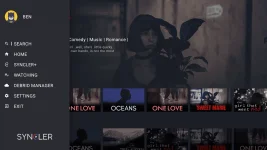
Pros:
You can make profiles
Nice Movie Interface (click back and go upward and choose between movie or tv)
Good posters
Made for android tv
Its in the play store (no need to sideload)
Free
No ads (based on my experience)
With tagalog movies (click back and click search to search movie)
There are many sources you can choose
Cons:
Minsan mali ang source niya so pick different sources until you're sure that's the movie
Instructions: (for android tv and android tv box)
1.download the app
2.open syncler
3.click back button twice and go to settings
4.go to visuals
5.set the 2 thumb zoom to 150
6.leave the 2 grid size to auto or 0
7.go to the bottom and click force tv UI
8.click the force hide notification bar
9.go back
10.click provider packages
11.click kosmos
12.go to your phone or any devices browser and go to syncler.net/install
13. after that, enter the code shown on the screen
14. then enter this source link You do not have permission to view the full content of this post. Log in or register now.
15.click done
16.done
Instructions: (for phone)
1.install the app above
2.open the app
3.go to settings
4.click provider packages
5.click kosmos
6.go to your phone or any devices browser and go to syncler.net/install
7. after that, enter the code shown on the screen
8.then enter this source link You do not have permission to view the full content of this post. Log in or register now.
9.click done
10.done
Feel Free to ask Questions
Check out my free IPTV Playlist: https://phcorner.org/posts/18244573/


