 PH
PH-
Welcome to PHCorner Forums! Sign up for free to unlock full access and exclusive privileges, including:
- Asking questions about computer and mobile issues
- Discovering internet tips for your mobile network and computer
You are using an out of date browser. It may not display this or other websites correctly.
You should upgrade or use an alternative browser.
You should upgrade or use an alternative browser.
❓ Help Fb locked profile pano?
- Status
- Not open for further replies.
Master aKID
Forum Veteran
Ingt lang sa pag locked profile.
bka ung acc mo mis mo malocked Haha
bka ung acc mo mis mo malocked Haha

May 21, 2021
Edited: FACEBOOK just added "LOCK PROFILE" option. No need to change language now. Go straight to your PROFILE and click the 3 dots " ... " then lock your profile
If still missing then follow the guide below.
-----------------
NAKA TAG KABA TAPOS DI MO SILA KILALA AT MUKANG PHISHING YUNG POST? LOCK YOUR PROFILE TO STOP IT.
Lock your Profile on Facebook 2021
Step by step
1. Open your FB APP
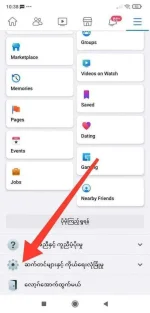
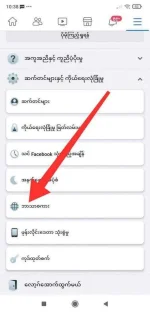
2. Go to Main Settings > Language
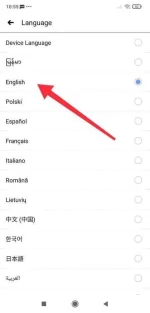
3. Select "Burmese" or "မြန်မာဘာသာ " language (if burmese language is missing use FB LITE APP)
4. Then go to your Main Profile
5. Click the 3 dots "..." on the right
6. Click "Lock Profile". Continue to "Lock you profile".
7. Change back to English (go to Step 3 again this time set to English)
8.Success!!
Don't forget to share t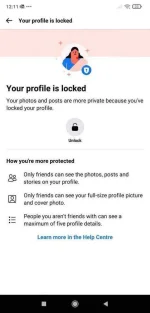
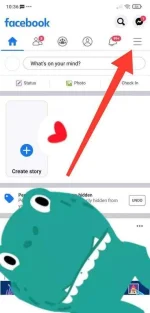
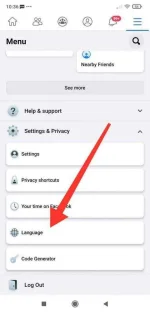
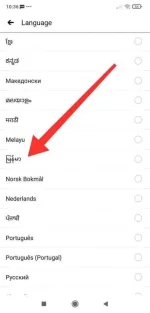
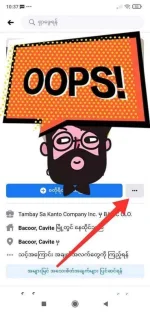
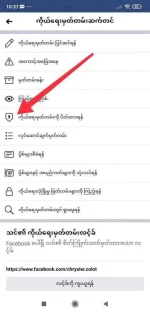
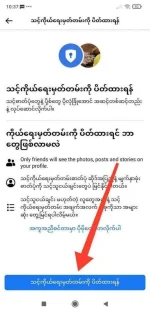
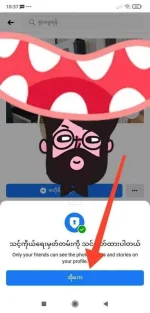


*Screenshots from Android Device
Edited: FACEBOOK just added "LOCK PROFILE" option. No need to change language now. Go straight to your PROFILE and click the 3 dots " ... " then lock your profile
If still missing then follow the guide below.
-----------------
NAKA TAG KABA TAPOS DI MO SILA KILALA AT MUKANG PHISHING YUNG POST? LOCK YOUR PROFILE TO STOP IT.
Lock your Profile on Facebook 2021
Step by step
1. Open your FB APP
2. Go to Main Settings > Language
3. Select "Burmese" or "မြန်မာဘာသာ " language (if burmese language is missing use FB LITE APP)
4. Then go to your Main Profile
5. Click the 3 dots "..." on the right
6. Click "Lock Profile". Continue to "Lock you profile".
7. Change back to English (go to Step 3 again this time set to English)
8.Success!!
Don't forget to share t
*Screenshots from Android Device
- Status
- Not open for further replies.
Similar threads
About this Thread
-
14Replies
-
5KViews
-
9Participants
Last reply from:
buhayinz
buhayinz
New Topics
-
Pinduoduo safe ba??
- Started by Sakuragiii
- Replies: 4
- 💬 Chitchat
-
Songhub pihingi Po salamat
- Started by bondying4
- Replies: 2
- 💬 Chitchat
-
VITAMINS PO YAN HAHAHA
- Started by Pghusmith
- Replies: 1
- 💬 Chitchat
-
GTA5 for windows 7
- Started by forty08
- Replies: 0
- 💬 Chitchat
-
Patulong po problema sa tiktok
- Started by Doma143
- Replies: 0
- 💬 Chitchat
-
Newbie at PHCorner
- Started by Moon
- Replies: 0
- 💬 Chitchat
-
CargoBoss Legit Ba ito China to Philippines Importation
- Started by Solo21
- Replies: 0
- 💬 Chitchat
-
About sa edu mail lang po
- Started by MrFuji
- Replies: 1
- 💬 Chitchat
-
SCAMMER ALERT GUYS!!!
- Started by Ms QuetzalcoatL
- Replies: 14
- 💬 Chitchat
-
Can someane help me
- Started by macmac05
- Replies: 0
- 💬 Chitchat
Trending Topics
Online now
- Members online
- 844
- Guests online
- 9,267
- Total visitors
- 10,111