 PH
PHHello guys! I'm back for another tutorial. 
Step 1:
Go to this website
You do not have permission to view the full content of this post. Log in or register now.
Step 2:
Fill up the Form
You do not have permission to view the full content of this post. Log in or register now.
Step 3:
After completing the form, you'll get the Voucher Code.
Final Step:
Then go to Windscribe VPN Sign up page (for new users) and then Redeem the Code.
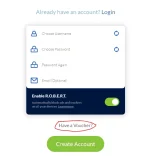
For existing users, log in to your account and click the 'Claim Voucher' button.

Step 1:
Go to this website
You do not have permission to view the full content of this post. Log in or register now.
Step 2:
Fill up the Form
You do not have permission to view the full content of this post. Log in or register now.
Step 3:
After completing the form, you'll get the Voucher Code.
Final Step:
Then go to Windscribe VPN Sign up page (for new users) and then Redeem the Code.
For existing users, log in to your account and click the 'Claim Voucher' button.