🔒 Closed How Check Dito Network Available In Your Area

Status
Not open for further replies.

RiceCake36

Enthusiast
How to Check if Dito Network is Available in your Area

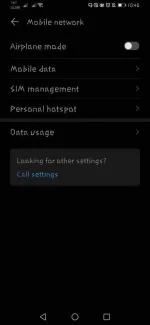
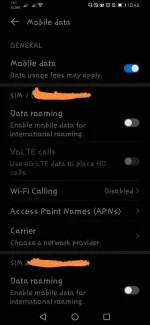
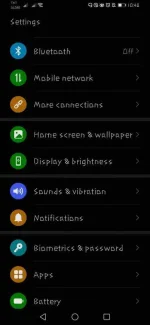
step1- Go to setting select Mobile Network and select Mobile Data
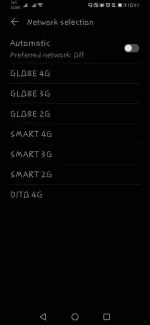
step2- Go to Carrier and choose manual provider
Step3- After scan, if you found 51566 or Dito 4G. It means Dito Network are now available in your area.
 

Attachments

  • Screenshot_20210507_224808_com.android.settings.webp
    Screenshot_20210507_224808_com.android.settings.webp
    30.6 KB · Views: 51
  • Screenshot_20210507_224818_com.android.settings.webp
    Screenshot_20210507_224818_com.android.settings.webp
    18 KB · Views: 38
  • Screenshot_20210507_225725.webp
    Screenshot_20210507_225725.webp
    34.7 KB · Views: 40
  • Screenshot_20210507_225103_com.android.phone.webp
    Screenshot_20210507_225103_com.android.phone.webp
    16.7 KB · Views: 39
Status
Not open for further replies.

About this Thread

  • 2
    Replies
  • 858
    Views
  • 3
    Participants
Last reply from:
megam0rph

Online now

Members online
1,111
Guests online
921
Total visitors
2,032

Forum statistics

Threads
2,274,846
Posts
28,958,781
Members
1,233,459
Latest member
LifeAfter20
Back
Top