 PH
PH
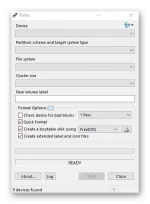
Rufus 3.14.1788 Portable : is a USB formatting utility that also can create a bootable USB drive using a bootable ISO image. This app requires admin rights. It can be especially useful in cases where: you need to create USB installation media from boot-able ISO (Windows, Linux, etc.), you need to work on a system that doesn’t have an OS installed, you need to flash a BIOS or other firmware from DOS, you want to run a low-level utility.
Rufus 3.14.1788 Features :
- Format USB, flashcard and virtual drives to FAT/FAT32/NTFS/UDF/exFAT/ReFS
- Create DOS bootable USB drives, using FreeDOS or MS-DOS
- Create BIOS or UEFI bootable drives, including UEFI bootable NTFS
- Create bootable drives from bootable ISOs (Windows, Linux, etc.)
- Create bootable drives from bootable disk images, including compressed ones
- Create Windows To Go drives
- Twice as fast as Microsoft’s USB/DVD tool or UNetbootin, on ISO -> USB creation (1)
- Perform bad blocks checks, including detection of “fake” flash drives
- Compute MD5, SHA-1, and SHA-256 checksums of the selected image
- Modern and familiar UI, with more than 35 languages natively supported
- Small footprint. No installation required.
- Portable
- 100% Free Software (GPL v3)
You do not have permission to view the full content of this post. Log in or register now.
