❓ Help Tungkol sa pag load kay GOMO

Status
Not open for further replies.

BagongBayani

HOLY SNIFF 🤣
Contributor
Paano ba process sa pag load kay gcash? Panload kay gomo

Yung alam ko lang kasi yung sa 7- Eleven, di rin ako sure kung paano yun kung si counter ba magpaprocess o ako dun sa Machine nila.

Gusto ko kasi magload ng 300 pesos magkano kayo dagdag nun?
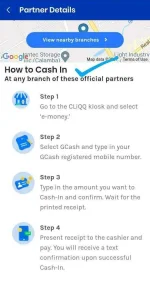
 
Cliqq kiosk
 

Attachments

  • Screenshot_20210506-101537_GCash.webp
    Screenshot_20210506-101537_GCash.webp
    61.5 KB · Views: 37
sa machine ka mismo mag load paps 300 pesos =300 load. if ever man di working yung machine sa 711, download ka lang ng cliqq app ng 711 sa phone mo tas pakita mo lang yung barcode sa cashier
 
Cash-in via 7-eleven Cliqq kiosk (sa loob ng store):
dun ka sa Cliqq kiosk, cash-in ka dun, by tapping e-wallets (nasa left side menu) > tap GCash > enter your number > confirm the number by clicking next > may receipt yan na lumabas > give the receipt to the Cashier along with the payment > wait for amount to arrive
Note: 1 is to 1 yung amount, 300 php = 300 papasok sa GCash e-wallet mo (if di mag exceed ng 8000 accumulated monthly cash-in via over-the-counter)

Load promos for GOMO:
open your GOMO app > at the bottom menu, tap Shop > tap Local promos > select the promo you desired (e.g. 30GB for 299) > select Payment method GCash, then proceed to payment details, dun mo bayaran ang promo using your GCash linked number, just follow steps till you're done.
 
Cliqq kiosk

sa machine ka mismo mag load paps 300 pesos =300 load. if ever man di working yung machine sa 711, download ka lang ng cliqq app ng 711 sa phone mo tas pakita mo lang yung barcode sa cashier

Cash-in via 7-eleven Cliqq kiosk (sa loob ng store):
dun ka sa Cliqq kiosk, cash-in ka dun, by tapping e-wallets (nasa left side menu) > tap GCash > enter your number > confirm the number by clicking next > may receipt yan na lumabas > give the receipt to the Cashier along with the payment > wait for amount to arrive
Note: 1 is to 1 yung amount, 300 php = 300 papasok sa GCash e-wallet mo (if di mag exceed ng 8000 accumulated monthly cash-in via over-the-counter)

Load promos for GOMO:
open your GOMO app > at the bottom menu, tap Shop > tap Local promos > select the promo you desired (e.g. 30GB for 299) > select Payment method GCash, then proceed to payment details, dun mo bayaran ang promo using your GCash linked number, just follow steps till you're done.

Sa cebuana or palawan ako nagka cash in,wala rin namang charge
Thanks sa info mga kuys 😉
 
Status
Not open for further replies.

About this Thread

  • 5
    Replies
  • 2K
    Views
  • 5
    Participants
Last reply from:
BagongBayani

Trending Topics

Online now

Members online
355
Guests online
553
Total visitors
908

Forum statistics

Threads
2,274,602
Posts
28,957,142
Members
1,234,341
Latest member
lolomopanot0102
Back
Top