🔒 Closed Antimalware Service Executable Very High Power Usage

Status
Not open for further replies.

thelastswordsma

Forum Guru
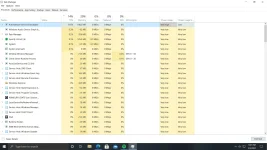
Patulong paano maayos to? Sobra magconsume ng power resource tong windows defender
already tried turning off real time protection at lahat ng nanduo kaso ganun padin

ung sa pinsan ko di namn ganyan kataas power consumption nung sa kanya
1620049693692.webp
 
Try to remove bloatware, common issues yan sa RAM usage. I highly recommend to watch Chris Titus Tech on YouTube. "Debloat Windows 10" yung video tutorial nya. Practical method to remove yung mga unwanted microsoft application, hindi mo na kailangan magpalit ng OS or reformat ng PC.
 
ako naidisable ko siya by renaming yung talagang app name nya is:

msmpeng.exe
to
msmpen.exe or msmpeng1.exe

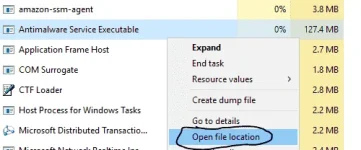
hanapin mo lang yung location ng exe i right click mo lang yung "Antimalware service exexutable" tapos open file location
1620051294291.webp

dito siya located:
C:\ProgramData\Microsoft\Windows Defender\Platform\4.18.2103.7-0

isave mo sa notepad o kaya isulat mo sa cp mo para matandaan mo yung location ng app na iyan.

dapat gagawin mo iyan sa bootable usb na os na may file explorer tulad ng mga linux o kaya portable windows tulad ng You do not have permission to view the full content of this post. Log in or register now.. Kasi pag nasa talagang windows 10 ka hindi mo marerename at maiidisable iyan.
 
Status
Not open for further replies.

About this Thread

  • 4
    Replies
  • 568
    Views
  • 5
    Participants
Last reply from:
ICE Coffee

Trending Topics

Online now

Members online
501
Guests online
811
Total visitors
1,312

Forum statistics

Threads
2,275,107
Posts
28,960,677
Members
1,233,595
Latest member
slotherhouse
Back
Top