 PH
PH-
Welcome to PHCorner Forums! Sign up for free to unlock full access and exclusive privileges, including:
- Asking questions about computer and mobile issues
- Discovering internet tips for your mobile network and computer
You are using an out of date browser. It may not display this or other websites correctly.
You should upgrade or use an alternative browser.
You should upgrade or use an alternative browser.
❓ Help Time And Date Keeps On Changing
- Thread starter minervaa
- Start date
- Status
- Not open for further replies.

paulosakuragi
Eternal Poster
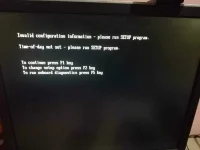
cmos battery replacement makikita mo yan sa mother board, yong bilog na kulay silver

- Status
- Not open for further replies.
Similar threads
-
❓ Help TIME AND DATE ERROR EVERY PC BOOT
- Started by Nellieyod
- Replies: 5
About this Thread
-
23Replies
-
651Views
-
5Participants
Last reply from:
minervaa
minervaa
New Topics
-
INTERNATIONAL WEBINAR AND 2 LOCAL SEMINAR
- Started by PHC-JIA
- Replies: 0
- ❓ Computer Discussion & Support
-
Pa req po AtmosFX for Halloween
- Started by YowGaming
- Replies: 0
- ❓ Computer Discussion & Support
-
Door Lock Keycard SDK
- Started by Porky Chao Fan
- Replies: 0
- ❓ Computer Discussion & Support
-
Counter strike sa mac
- Started by AYuna23
- Replies: 0
- ❓ Computer Discussion & Support
-
Booting Issue - FA506NFR
- Started by Impossible
- Replies: 0
- ❓ Computer Discussion & Support
-
Acrobat Pro DC ρá†ch. Need Help
- Started by skullkrasher99
- Replies: 3
- ❓ Computer Discussion & Support
-
Enlighten me please with these two
- Started by Jeii
- Replies: 4
- ❓ Computer Discussion & Support
-
Win 10 Home keys
- Started by Ali246
- Replies: 6
- ❓ Computer Discussion & Support
Trending Topics
Online now
- Members online
- 1,296
- Guests online
- 8,904
- Total visitors
- 10,200