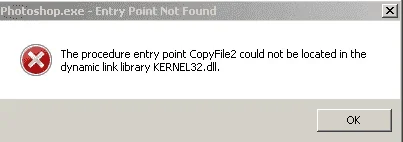
🔒 Closed Pahelp po sa adobe photoshop ko lagi ganyan

Status
Not open for further replies.

Phc-TgrStnceee

Eternal Poster
pahelp po di ko po alam ano gagawin dyan please
1619629222346.webp
 
ETO boss nahanap ko.

follow the below mentioned steps let me know if they work:


1. Uninstall current Ps CC app, If there are any issues with CC uninstall then run the Cleaner tool to remove Ps CC :You do not have permission to view the full content of this post. Log in or register now. .

2. Restart your system

2. Install Ps CC app from Creative Cloud

3. Do not launch Ps

4. Update to 14.1.2 via the Creative Cloud desktop application

5. Once the updates are successfully applied, Launch Ps CC to verify.
 
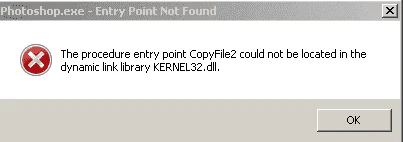
help po di ko po alam ano gagawin dyan please
1619629222346.png

Try this, Phc-Markyy:

1. Download 👇 this 👇 and run/install it on your computer.
You do not have permission to view the full content of this post. Log in or register now.

2. After finishing the installation, restart your computer.

3. When you are back to your desktop screen, launch your Photoshop program and see if it opens properly now.

Good luck and hope this helps.

-MwNN 🤠
 
Status
Not open for further replies.

About this Thread

  • 5
    Replies
  • 333
    Views
  • 3
    Participants
Last reply from:
Phc-TgrStnceee

Trending Topics

Online now

Members online
414
Guests online
893
Total visitors
1,307

Forum statistics

Threads
2,275,079
Posts
28,960,506
Members
1,233,574
Latest member
Toktokpaff
Back
Top