PH
PHSana Maka tulong itong topic:
1. Pindutin Windows Key + R. Type services.msc, tapos enter
2. Hanapin winsows Update
3. Right-Click sa Windos Update. tapos piliin ang Properties.
4. Sa ilalim ng General Tab, E set Startup type sa Disabled.
5. Pindutin and Stop, Tapos Apply then OK
6. E restart ang computer
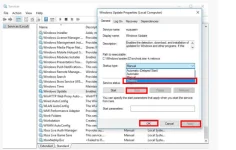
1. Pindutin Windows Key + R. Type services.msc, tapos enter
2. Hanapin winsows Update
3. Right-Click sa Windos Update. tapos piliin ang Properties.
4. Sa ilalim ng General Tab, E set Startup type sa Disabled.
5. Pindutin and Stop, Tapos Apply then OK
6. E restart ang computer