PH
PH TNT SMART SUN
 NO LOAD TUTORIAL
Step 1: Download V2RAYNG on playstore
You do not have permission to view the full content of this post. Log in or register now.
Step 2: copy this messege at ilagay sa notes ng phone mo.
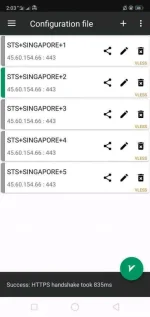
Step 3: import Server/Input ID ACCOUNT
Step 4: Connect
-Server List :
✓Singapore 1:
vless://input_your_id_here@45.60.154.66:443?path=%2Fgtmv2ray%2F&security=tls&encryption=none&host=private-sg6.nitro-vpn.
 com&type=ws#STS%2BSINGAPORE%2B1
-------------------------------------------------------------------------------
✓Singapore 2:
vless://input_your_id_here@45.60.154.66:443?path=%2Fgtmv2ray%2F&security=tls&encryption=none&host=private-sg7.nitro-vpn.
com&type=ws#STS%2BSINGAPORE%2B2-------------------------------------------------------------------------------
✓Singapore 3:
vless://input_your_id_here@45.60.154.66:443?path=%2Fgtmv2ray%2F&security=tls&encryption=none&host=private-sg8.nitro-vpn.
com&type=ws#STS%2BSINGAPORE%2B3-------------------------------------------------------------------------------
✓Singapore 4:
vless://input_your_id_here@45.60.154.66:443?path=%2Fgtmv2ray%2F&security=tls&encryption=none&host=private-sg9.nitro-vpn.
com&type=ws#STS%2BSINGAPORE%2B4-------------------------------------------------------------------------------
✓Singapore 5:
vless://input_your_id_here@45.60.154.66:443?path=%2Fgtmv2ray%2F&security=tls&encryption=none&host=private-sg10.nitro-vpn.
com&type=ws#STS%2BSINGAPORE%2B5-------------------------------------------------------------------------------
Take Note!!
°FIRST: Removed Emoji
°2nd : Copy Server Code
° 3rd :Then Open V2RAYNG App
Click mo Yung
IMPORT CONFIG FROM CLIPBOARD
Done Import
Connect and enjoy Surfing