 PH
PHX Icon Changer - Customize App Icon & Shortcut v3.0.9 [Pro]
Requirements: 4.1+
Overview: X Icon Changer is a totally free and useful app which can help you to change & customize icons and names for any apps
HOW TO USE
1. Enter X Icon Changer.
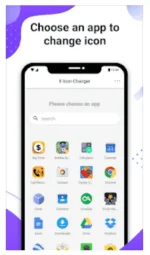
2. Choose an app to change the icon.
3. Select a new image from the built-in icon packs your gallery other app icons or third-party personalized icon packs.
4. Edit a new name (can be null) for the app.
5. Go to home screen / desktop to see the new shortcut icon.
ABOUT THE WATERMARK
On Android 8.0 and above the system will automatically add a watermark to the shortcut icon. We provide a way for you to perfectly change app icons without any marks by widget technology:
1. Go to your phone’s home screen / desktop press & hold a blank space. Then click Widgets from the pop-up menu.
2. Find X Icon Changer in widgets page touch & hold it and drag it to your desktop.
3. The widget of X Icon Changer will be opened automatically. After that you can change your app icon without any marks.
There are lots of selected personalized icon packs built in X Icon Changer. The app and those icon packs are all free to get. Just download X Icon Changer now to decorate your android phone.
What's New:
Performance improved.
ρáíd Unlocked
Removed Trash files
Debug info Removed
This app has Credit advertisements
PaFeedback nalang po
Salamat po
Links:
You do not have permission to view the full content of this post. Log in or register now.
You do not have permission to view the full content of this post. Log in or register now.
Alternative links:
You do not have permission to view the full content of this post. Log in or register now.
You do not have permission to view the full content of this post. Log in or register now.
Requirements: 4.1+
Overview: X Icon Changer is a totally free and useful app which can help you to change & customize icons and names for any apps
HOW TO USE
1. Enter X Icon Changer.
2. Choose an app to change the icon.
3. Select a new image from the built-in icon packs your gallery other app icons or third-party personalized icon packs.
4. Edit a new name (can be null) for the app.
5. Go to home screen / desktop to see the new shortcut icon.
ABOUT THE WATERMARK
On Android 8.0 and above the system will automatically add a watermark to the shortcut icon. We provide a way for you to perfectly change app icons without any marks by widget technology:
1. Go to your phone’s home screen / desktop press & hold a blank space. Then click Widgets from the pop-up menu.
2. Find X Icon Changer in widgets page touch & hold it and drag it to your desktop.
3. The widget of X Icon Changer will be opened automatically. After that you can change your app icon without any marks.
There are lots of selected personalized icon packs built in X Icon Changer. The app and those icon packs are all free to get. Just download X Icon Changer now to decorate your android phone.
What's New:
Performance improved.
ρáíd Unlocked
Removed Trash files
Debug info Removed
This app has Credit advertisements
PaFeedback nalang po
Salamat po
Links:
You do not have permission to view the full content of this post. Log in or register now.
You do not have permission to view the full content of this post. Log in or register now.
Alternative links:
You do not have permission to view the full content of this post. Log in or register now.
You do not have permission to view the full content of this post. Log in or register now.