 PH
PHTHIS THREAD IS OUTDATED.
JUST A GUIDE FOR BEGINNERS!
STEP BY STEP FOR LOCATING
CLASH OF CLANS ROOT FOLDER.
FOR THE UPDATED TRAPS/TESLAS
VISIBLE TRAPS & TESLAS
December 13, 2015
JUST A GUIDE FOR BEGINNERS!
STEP BY STEP FOR LOCATING
CLASH OF CLANS ROOT FOLDER.
FOR THE UPDATED TRAPS/TESLAS
VISIBLE TRAPS & TESLAS
December 13, 2015
Some members of this forum doesn't know how to do this trick just because they aren't familiar on browsing their phone files and/or they're just confused.
I am going to show/guide you on how to make traps visible. This is just a beginners guide, so pros', respect.
Important notes: Your phone must be rooted. You can use Framaroot and/or Kingroot, etch. Just search it in google, one click root tutorial.
Required Files: Attachment available.
1. Root Explorer…
2. The cvs file…
2. The cvs file…
You need to download and install the 2 attached files first before you proceed. (Download muna natin ang dalawang files na naka attached.)
First Step: Open Root Explorer. As you can see there are 2 tabs which is Root and Storage. We will go first to Clash of Clans files on Root Tab. Go and find data. (See screenshot below…)
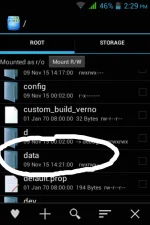
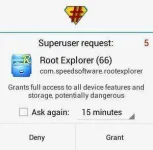
If a root permission will popped-up, don't worry you are following the right path. Just click ok/Grant to give access.
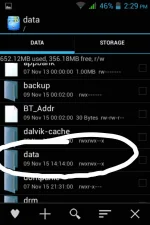
Second Step: Same as first step. Go and find the sub-folder named data. (See screenshot below…)
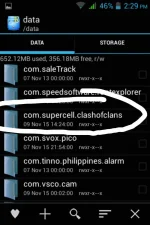
Third Step: After we enter the data/data location, we will now go to Clash of Clans folder. Go and find com.supercell.clashofclans folder. (See screenshot below…)
Fourth Step: And now we're in data/data/com.supercell.clashofclans folder. Now we need to go to the folder which we will put the modded csv file. Scroll to the buttom and we will go to update folder. (See screenshot below…)
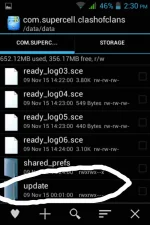
Fifth Step: Finally we are here! As you can see there is csv folder and a file named fingerprint.json. And now we will go to Logic folder which we will put the csv file. As you can see, there is no sub-folder entitled Logic here. We will make the folder to put the csv file. Click the cross (+) sign which indicates to make new file and/or folder. (See screenshot below…)
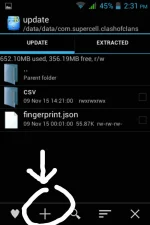
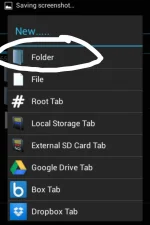
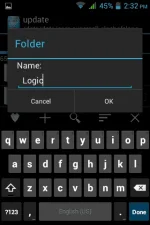
Sixth Step: As I mentioned in First Step, there are 2 tabs in Root Explorer and that is The Root Tab and The Storage Tab. And now we're finally located the Logic folder (data/data/com.supercell.clashofclans/update/Logic), the next step is the csv file. Locate the file you've downloaded named Logic.zip using Root Explorer (Click the 2nd tab in root explorer entitled Storage). Open it and mark checked the two csv file and click the icon in the lower left side which indicates to unzip/extract it. (See screenshot below…)
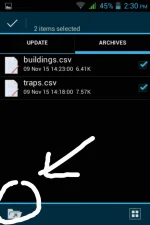
Seventh Step: After you clicked the extract icon, message will popped-up and just click the Go to extracted file and you will be redirect to the csv file you unzipped. Mark the csv file checked again and click the copy icon in lower left side. (See screenshot below…)
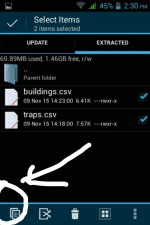
Eight/Final Step: After you copied the csv file, go back to the first tab in root explorer entitled Logic. The title has been changed to logic because you are in the folder entitled Logic. Just paste or click Copy Here to paste the csv file. (data/data/com.supercell.clashofclans/update/Logic <- Here you must paste the csv file to make it work.)


