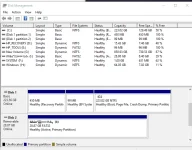
ano ba laman nyan kung di importante clean mo muna bago iformat.
and follow these steps
press windows+r > type cmd > type 'diskpart' > type 'listdisk' > type 'select disk 1 (eg: ung disk mo 32gb hanapin mo anong disk number ng usb mo at un ang ilagay mo sa select disk number)> type 'clean' > type 'create partition primary' > type 'format fs=ntfs quick'
virus yan at kaya not responding yung file manger/explorer mo dahil busy pa yung virus pag-copy nya at pag-attach sarili nya dyan sa desktop/laptop mo kaya pati yang device mo infected na rin yan
sa pagkaalam ko parang conficker worm ang ganyan kung mag-behave
install ka ng 𝐌𝐚𝐥𝐰𝐚𝐫𝐞𝐛𝐲𝐭𝐞𝐬 at kung may option sya na mag-scan in safe mode then mas better
 PH
PH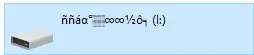 ayan tapos mag not responding ung file manager lmao