PH
PHShadowCrew99CS
Grasshopper
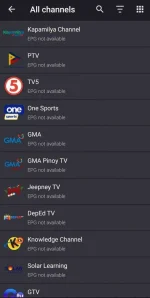
How to get Philippine Cable TV Channel on your Android
1. Download kayo any IPTV App. Example Televizio gamitin natin.
You do not have permission to view the full content of this post. Log in or register now.
2. Then download natin yung M3u playlist. Eto yung parang mga channel link.
You do not have permission to view the full content of this post. Log in or register now.
3. Now balik ka sa Telivizio app mo. Sa upper right corner click mo yung gear icon then choose "Playlist"
then click yung plus sign.
4. Pagka click ng plus sign lagyan mo name playlist mo. Example "Philippine Cable TV" then click "Or
attach file" then choose yung dinownload natin na "UpdatedPH.m3u.txt"
5. Now enjoy zero monthly fee cable TV Channels.
DISCLAIMER: I DID NOT COMPILE YUNG M3U LIST. NA FOWARD LANG SAKIN TO. JUST SHARING IT TO EVERYONE. CREDITS TO THE RIGHTFUL OWNER NA NAGPAKAHIRAP MAGCOMPILE