 PH
PHApowersoft Screen Capture Pro 1.4.10.2
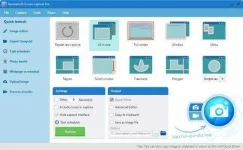

Apowersoft Screen Capture Pro (Repack & Portable) is a multifunctional program for creating screenshots.
The program provides a wide range of screenshot modes, from full screen snapshot to snapshot of scroll windows. If necessary, you can edit the screenshot using the built-in mini-editor or full-featured image editor. In addition, the program offers a task scheduler aimed at creating automatic screenshots at a specified time.
In addition to the functions described above, the program can record actions on the computer screen with sounds, save screenshots in free cloud storage, and allows you to share images via Facebook, Google+, Twitter and other resources.
Key features:
• Create snapshots of all actions on the screen
• Create a schedule of screenshots
• Supports multiple capture modes for images and videos
• Simple and advanced image editor
• Sharing images on social networks
• Upload pictures to free cloud storage
• Record action on screen with high quality audio
• More than 9 video conversion formats and 6 image formats
• Intuitive and elegant ribbon interface
• Capture different shapes on the screen
• Different gripping modes for all needs
• Simple and advanced ways to edit images
• Share images to social networks with one click
• Free cloud storage for all users
• Reliable task scheduler for screen capture
Features Repack Apowersoft Screen Capture Pro:
1. Combined installation of the program or unpacking of the portable (portable app format) version in one distribution kit
2. Does not require registration (ρá†ch)
3. Multilingual interface (including Russian / Russification Dodakaedr + added lrepacks.net/)
4. Picks up an external configuration file config.ini (if located next to the installer)

You do not have permission to view the full content of this post. Log in or register now.