 PH
PHMediCat USB Benefits
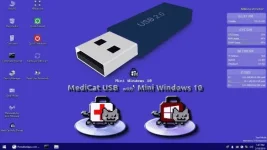
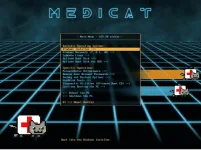
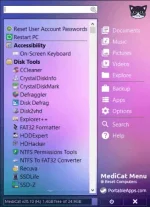
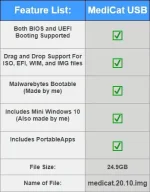
Backup and Recovery, Boot Repair, Diagnostic Tools, Partition Tools, Password Removal, Windows Recovery, Including Mini Windows PE, 𝐌𝐚𝐥𝐰𝐚𝐫𝐞𝐛𝐲𝐭𝐞𝐬, Portable Apps, and a lot of other applications. BIOS booting and UEFI booting supported.
Content:
- Mini Windows 10 Enterprise (WinPE)
- Lubuntu Linux
- Active@ Boot Disk
- 𝐌𝐚𝐥𝐰𝐚𝐫𝐞𝐛𝐲𝐭𝐞𝐬 Anti-Malware
- Remove User Accounts Passwords
- Harddisk Tools
- Diagnostic Utilities (Ultimate Boot CD)
- PortableApps.com
- Active@ BootDisk
- AOMEI Partition Assistant
- EaseUS Partition Master
- MiniTool Partition Wizard
- Parted Magic
- Acronis True Image
- MiniTool Power Data Recovery
- EaseUS Todo Backup
- AOMEI Backupper
- Symantec Ghost
- Macrium Reflect
- O&O BlueCon
- AIDA64
- Recuva
- Speccy
- Lazesoft Recovery Suite
- CCleaner
- Defraggler
- SD Formatter
- SSDLife
- Speccy
- AIDA64
- Backup and Restore Drivers
- Driver Booster
- Driver Updater
- USB Flash Drive Format Tool
- IrfanView
- Dead Pixel Tester
- Symantec Ghost
- MediaCreatonTool
- Windows ISO Downloader
- WinToHDD
- WinUSB
- uTorrent
- Wise Registry Cleaner
- Dr.Web CureIt
- ESET online scanner
- McAfee Stinger
- RAMExpert
- CPU-Z
- BurnAware
- SUPERAntiSpyware
- 7-Zip
- Autoruns
- Recuva
- PasswordChanger
- SUMo
- Process Explorer
- Unstoppable Copier
- IObit Unlocker
- Windows Password Recovery
- WirelessKeyView
- Mozilla Firefox
- Google Chrome
- Opera
- ImgBurn
- UltraISO
- InfraRecorder
- Ant Renamer
- WinMerge
- WizTree
- TreeSize
- WinRAR
- FastCopy
- Macrorit Data Wiper
- Rufus
- EasyBCD
- EaseUS Partition Recovery
- Macrorit Partition Expert
- WirelessNetView
- TeamViewer
- KeePass
- VeraCrypt
- Avira PC Cleaner
- Emsisoft Emergency Kit
- Magical Jelly Bean Keyfinder
- Audacity
- VLC media player
- SumatraPDF
- … and much more …
Requirements:
USB stick with a minimum of 32 GB.
Note 1: First thing to do is disable any “real-time scanning” in your antivirus software temporarily, including Windows Defender. Otherwise, you will have applications get deleted from your USB stick during creation, and things won’t work properly.
Note 2: Please use You do not have permission to view the full content of this post. Log in or register now. and follow the instructions to help you make a bootable USB stick successfully.
Instructions for ImageUSB:
Note: If you like this download, please click on the “Say Thank You” button.
Be patient, as many users access the files at the same time, it may take longer for starting the download to succeed.
How to create a bootable USB drive with ImageUSB

Note 1: First thing to do is disable any “real-time scanning” in your antivirus software temporarily, including Windows Defender. Otherwise, you will have applications get deleted from your USB stick during creation, and things won’t work properly.
Note 2: Please use You do not have permission to view the full content of this post. Log in or register now. and follow the instructions to help you make a bootable USB stick successfully.
Instructions for ImageUSB:
Note: If you like this download, please click on the “Say Thank You” button.
Be patient, as many users access the files at the same time, it may take longer for starting the download to succeed.
How to create a bootable USB drive with ImageUSB
Simpleng React lang sapat na

Spoiler contents are visible only to Established Members.



