 PH
PH-
Welcome to PHCorner Forums! Sign up for free to unlock full access and exclusive privileges, including:
- Asking questions about computer and mobile issues
- Discovering internet tips for your mobile network and computer
You are using an out of date browser. It may not display this or other websites correctly.
You should upgrade or use an alternative browser.
You should upgrade or use an alternative browser.
🔒 Closed Shadowsocks pc
- Thread starter Dazeee
- Start date
- Status
- Not open for further replies.
Yes, If you're using a "socks proxy" of shadowsocks, you'll need httping. Follow the guide here using httping:
You do not have permission to view the full content of this post. Log in or register now.
Get it the tool here: You do not have permission to view the full content of this post. Log in or register now.
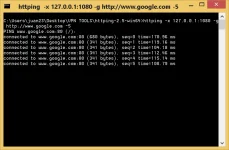
Shadowsocks also connects using random http proxy (port) via privoxy. Look it up on your ss_win_temp folder when it connects, check your privoxy_xxxxxx.conf file. Then use httping or any standard pinger utility you like.
sample:
You do not have permission to view the full content of this post. Log in or register now.
Get it the tool here: You do not have permission to view the full content of this post. Log in or register now.
Shadowsocks also connects using random http proxy (port) via privoxy. Look it up on your ss_win_temp folder when it connects, check your privoxy_xxxxxx.conf file. Then use httping or any standard pinger utility you like.
sample:
 UP
UPSir how to set up shadowsocks for pc?Yes, If you're using a "socks proxy" of shadowsocks, you'll need httping. Follow the guide here using httping:
You do not have permission to view the full content of this post. Log in or register now.
Get it the tool here: You do not have permission to view the full content of this post. Log in or register now.
Shadowsocks also connects using random http proxy (port) via privoxy. Look it up on your ss_win_temp folder when it connects, check your privoxy_xxxxxx.conf file. Then use httping or any standard pinger utility you like.
sample:
View attachment 1357941
Balik ako sa Tagalog bosing he he. Ang daming tutorial sa HOME page under TRENDING. Kakatingin ko lang. Ito yung isa.SirA how to set up shadowsocks for pc?
https://phcorner.org/threads/shadowsocks-for-pc-with-v2ray-plugin.1030333/
Ito yung guide ko na na-post noong nakaraan. Pero sa taas lang ay detalyado na.
https://phcorner.org/threads/how-to...ay-plugin-step-by-step-tutorial-help.1037362/
Dahil di ka naman gagawa ng obfuscated SS server at gagamit ka lang as client, i-setup mo lang yung SS GUI mo ayon sa guides. Ang kailangan mo ay yung provided na SS URL o yung tinatawag nilang "hùbád" na i- copy mo sa clipboard tapos gamitan mo ng import option sa SS GUI. Alam mo na siguro yung gimmick ng mga galante na click
 Like,
Like,  Love,
Love,  Haha,
Haha,  Wow para lumitaw yung spoiler na paisa-isa. Be sure latest server account para laging buhay, kaya lagi kang mag-ipon ng back-up. Lantad naman lahat ng detalye ng server account di tulad sa android GUIs na karamihan ay encrypted format.
PS. Sa pc, pwedeng rin bigyan ka ng json file (config), pwedeng manu-manong I-edit sa server menu kung makakuha ka ng detailed server account o i-scan yung QR-code kung provided din. Yan yung possibilities para makakuha ka ng live server accounts. Kailangan lang ng kaunting praktis sa paggamit ng SS GUI at since 2012 pa kasi yan.
Yeah ito gamit ko mga bossing at ang bilis nya poBalik ako sa Tagalog bosing he he. Ang daming tutorial sa HOME page under TRENDING. Kakatingin ko lang. Ito yung isa.
https://phcorner.org/threads/shadowsocks-for-pc-with-v2ray-plugin.1030333/
Ito yung guide ko na na-post noong nakaraan. Pero sa taas lang ay detalyado na.
https://phcorner.org/threads/how-to...ay-plugin-step-by-step-tutorial-help.1037362/
Dahil di ka naman gagawa ng obfuscated SS server at gagamit ka lang as client, i-setup mo lang yung SS GUI mo ayon sa guides. Ang kailangan mo ay yung provided na SS URL o yung tinatawag nilang "hùbád" na i- copy mo sa clipboard tapos gamitan mo ng import option sa SS GUI. Alam mo na siguro yung gimmick ng mga galante na click View attachment 1358063 Like, View attachment 1358064 Love, View attachment 1358065 Haha, View attachment 1358066 Wow para lumitaw yung spoiler na paisa-is. Be sure latest server account para laging buhay, kaya lagi kang mag-ipon ngback-up. Lantad naman lahat ng detalye ng server account di tulad sa android GUIs na karamihan ay encrypted format.
PS. Sa pc, pwedeng rin bigyan ka ng json file (config), pwedeng manu-manong I-edit sa server menu kung makakuha ka ng detailed server account o i-scan yung QR-code kung provided din. Yan yung possibilities para makakuha ka ng live server accounts. Kailangan lang ng kaunting praktis sa paggamit ng SS GUI at since 2012 pa kasi yan.

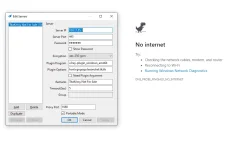
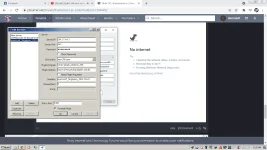
Salamat po sa reply pero na try ko na po kagabi ayaw mag load, na follow ko naman lahat.Balik ako sa Tagalog bosing he he. Ang daming tutorial sa HOME page under TRENDING. Kakatingin ko lang. Ito yung isa.
https://phcorner.org/threads/shadowsocks-for-pc-with-v2ray-plugin.1030333/
Ito yung guide ko na na-post noong nakaraan. Pero sa taas lang ay detalyado na.
https://phcorner.org/threads/how-to...ay-plugin-step-by-step-tutorial-help.1037362/
Dahil di ka naman gagawa ng obfuscated SS server at gagamit ka lang as client, i-setup mo lang yung SS GUI mo ayon sa guides. Ang kailangan mo ay yung provided na SS URL o yung tinatawag nilang "hùbád" na i- copy mo sa clipboard tapos gamitan mo ng import option sa SS GUI. Alam mo na siguro yung gimmick ng mga galante na click View attachment 1358063 Like, View attachment 1358064 Love, View attachment 1358065 Haha, View attachment 1358066 Wow para lumitaw yung spoiler na paisa-is. Be sure latest server account para laging buhay, kaya lagi kang mag-ipon ngback-up. Lantad naman lahat ng detalye ng server account di tulad sa android GUIs na karamihan ay encrypted format.
PS. Sa pc, pwedeng rin bigyan ka ng json file (config), pwedeng manu-manong I-edit sa server menu kung makakuha ka ng detailed server account o i-scan yung QR-code kung provided din. Yan yung possibilities para makakuha ka ng live server accounts. Kailangan lang ng kaunting praktis sa paggamit ng SS GUI at since 2012 pa kasi yan.
ang smooth gamitinSalamat po sa reply pero na try ko na po kagabi ayaw mag load, na follow ko naman lahat. View attachment 1358112
sarap manood movies Salamat po sa reply pero na try ko na po kagabi ayaw mag load, na follow ko naman lahat. View attachment 1358112
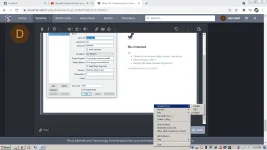
Check mo pala pre system proxy mo kng nka global na kng wla ka nmn error na encounter
Salamat po sa reply pero na try ko na po kagabi ayaw mag load, na follow ko naman lahat. View attachment 1358112
Ang masasabi ko lang sa pic mo. Kung yung shadowscks server dyan ay "buhay" at yung "v2ray-plugin_windows_amd64.exe" plugin na tagged mo ay nandyan sa SS folder ay "wala" ka dapat problema. Ang ibig sabihin ay patay na yung account ng server.
Kung binasa mong maigi yung instructions ko ay makukuha mo yung ibig kong sabihin.
Simple lang naman ang setup.
Code:
1. Download SS GUI and extract anywhere
2. Download plugin and extract inside SSGUI main folder
3. Input your live server account and be sure that the name of obfs plugin corresponds to the name of "plugin program" used in your server
   ex. Plugin Program = v2ray-plugin , actual name in folder is v2ray-plugin.exe
In case you're using many servers, be sure you edit the plugin names corresponding to the plugin binary name for ease of use
4. Be sure your live server is "checked" in your Server dropdown list
For advance users, with multiple live servers you can highlight "Load Balance" or "High Availability" as other options
5. Be sure that "System Proxy" is set to "Global" for automatic proxying. Chrome utilizes this smoothly - not sure about Firefo
You need to verify
If not, you have to set it manually yourself in your net application proxy option, or even set it using proxifier or similar tools (if you have one)
Kung gusto mong i-test, punta ka sa Tcpvpn, gawa ka ng SS account doon at isalpak mo sa GUI mo. Be sure may live net ka muna to test kung ok yung tool mo. Pero kung umubra sa free net, eh di OK din he he. Updated na yung servers nila ngayon for this SS+plugin setup. Pati AEAD ciphers bago na. Wish you luck na lang bosing.
noobmaster6969696969
Established
bat ayaw mag run yung httping lods?
Myexistence
Honorary Poster
Bm ko muna ito. Thank you.
Myexistence
Honorary Poster
Yung ga nilqlapag dito po pwede gamitin shadowsock server?
ace0411gray
Honorary Poster
Thanks
Bosing, kapag umandar na yung SS GUI mo na may naka-select na live server at ang socks port na gamit mo ay 1080 doon, open ka ng console command sa folder ng httping. Tapos, ito ang type mo sa console screen:
Kahit naka-puti pa yang SS icon sa taskbar (meaning naka-disable siya), dapat may connection siya tulad ng pic na binigay ko. Dahil sa pinging, makikita mong buhay ang SS server mo dahil may red and (blinking) blue arrow sa unahan niya. Ibig sabihin, may indication ng data transfer back and forth sa pc mo at server. Ganoon din ang case kung i-select mo sa "Global" (where SS icon turns blue).
Code:
httping -x 127.0.0.1:1080 -g http://www.google.com -5Kahit naka-puti pa yang SS icon sa taskbar (meaning naka-disable siya), dapat may connection siya tulad ng pic na binigay ko. Dahil sa pinging, makikita mong buhay ang SS server mo dahil may red and (blinking) blue arrow sa unahan niya. Ibig sabihin, may indication ng data transfer back and forth sa pc mo at server. Ganoon din ang case kung i-select mo sa "Global" (where SS icon turns blue).
slayspawned
Leecher
e paano kaya mga sir naka shadowsocks ako sa pc, kaso for web lang sya gumagana. tinatry ko sa garena o any software to make it online di gumagana. sa web browser lang talaga sya pwede.
- Status
- Not open for further replies.
Similar threads
-
-
-
🔗 Direct Link ASSASSIN'S CREED SHADOWS CRACKED (voices.38) NOT HV
- Started by darkestra
- Replies: 12
-
-
👥 Referral Hindi Crypto, Hindi Scam: Literal na 'No-Work' Dollar Earning Gamit ang Lumang Phone at PC
- Started by unGuardable
- Replies: 3
About this Thread
-
20Replies
-
1KViews
-
10Participants
Last reply from:
alist1986
alist1986
New Topics
-
About TM sim registration
- Started by jebhgytrytr76567576
- Replies: 0
- 🌐 Globe & TM
-
Unligo99 tiktok and gtm no load piling area lang to our ρáíd vpn 50 a month
- Started by amber vpn
- Replies: 0
- 🌐 Globe & TM
-
Oct.9 v2ray ph go99+tiktok/gowatch/pc/android/ios
- Started by _-_-LhOnZ-_-_
- Replies: 3
- 🌐 Globe & TM
-
-
Oct/8 ph low ping gaming vless config
- Started by ace0486
- Replies: 19
- 🌐 Globe & TM
Trending Topics
-
-
Oct.6globe/GO99+unlitiktok/GOwatch/Android ios PC /ovpn/netmod/npv tunnel/
- _-_-LhOnZ-_-_
Replies: 11 -
-
Oct.4globe/GO99+unlitiktok/GOwatch/Android ios PC /ovpn/netmod/npv tunnel/
- _-_-LhOnZ-_-_
Replies: 11 -
-
-
-
-
-
VERTEX SNIPHER FOR GLOBE GO99 UNLI TIKTOK AND GOMO UNLI TIKTOK WITH PH SERVER FAST
- _SNIPHER_CBH_
Replies: 16
Online now
- Members online
- 1,086
- Guests online
- 5,026
- Total visitors
- 6,112