 PH
PH1st create faucetpay account
Click the link below to register.
You do not have permission to view the full content of this post. Log in or register now.
2nd add DOGE wallet address or just copy the DOGE address on deposit section.
3rd. Download Hopa app
Link : You do not have permission to view the full content of this post. Log in or register now.
4th. Open Hopa app copy the link below and paste it to Hopa browser app.
Link: You do not have permission to view the full content of this post. Log in or register now.
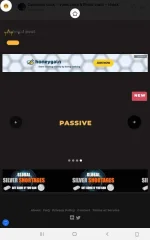
5th. How to sign in in winalittle.fun back to the faucet pay and copy the linked doge address you linked in the paucet pay and click the crown in the upper left icon then click the icon on the left lower and put your doge address and put any name click save. To get passive earning doge every 10mnts just click the passive earning in the choices box. Then click the play button and leave it open. Now minimize the Hopa app and the Hopa app will run in background and don't close the circle icon because that's the Hopa app. That's all thanks.
Proof payment via faucet pay see the screenshot below.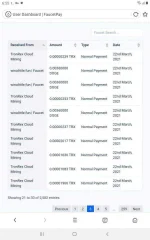
Click the link below to register.
You do not have permission to view the full content of this post. Log in or register now.
2nd add DOGE wallet address or just copy the DOGE address on deposit section.
3rd. Download Hopa app
Link : You do not have permission to view the full content of this post. Log in or register now.
4th. Open Hopa app copy the link below and paste it to Hopa browser app.
Link: You do not have permission to view the full content of this post. Log in or register now.
5th. How to sign in in winalittle.fun back to the faucet pay and copy the linked doge address you linked in the paucet pay and click the crown in the upper left icon then click the icon on the left lower and put your doge address and put any name click save. To get passive earning doge every 10mnts just click the passive earning in the choices box. Then click the play button and leave it open. Now minimize the Hopa app and the Hopa app will run in background and don't close the circle icon because that's the Hopa app. That's all thanks.
Proof payment via faucet pay see the screenshot below.