A angelo cruz Elite Mar 21, 2021 #1 mga ka phc help naman paano kaya palabasin yung sa windows ko nawala kasi
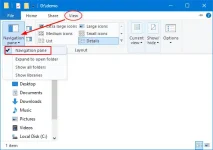
1 1neWay Forum Expert Mar 21, 2021 #2 Try mo po Press the Windows key + E hotkey to open Windows Explorer. Click the View tab, and then click the Navigation pane button in the ribbon. In the drop-down menu, you can click to check or uncheck the “Navigation pane” option. Mar 21, 2021 Upvote 0 Downvote
Try mo po Press the Windows key + E hotkey to open Windows Explorer. Click the View tab, and then click the Navigation pane button in the ribbon. In the drop-down menu, you can click to check or uncheck the “Navigation pane” option.
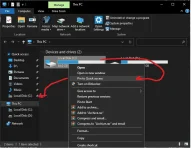
K Kentify Contributor Mar 21, 2021 #3 Open File Explorer > Right Click Windows (C: ) > Click Pin to Quick Access Mar 21, 2021 Upvote 0 Downvote
TS TS A angelo cruz Elite Mar 21, 2021 #4 thanks akala ko nag ka virus nanaman kasi last month nag ka virus laging nadedetect ng anti virus ko yung virus pero hindi ko ma delete at bumagal sya Upvote 0 Downvote
thanks akala ko nag ka virus nanaman kasi last month nag ka virus laging nadedetect ng anti virus ko yung virus pero hindi ko ma delete at bumagal sya
K Kentify Contributor Mar 21, 2021 #7 [XX='angelo cruz, c: 965180, m: 178698'][/XX] Download and install 𝐌𝐚𝐥𝐰𝐚𝐫𝐞𝐛𝐲𝐭𝐞𝐬 here https://www.𝐌𝐚𝐥𝐰𝐚𝐫𝐞𝐛𝐲𝐭𝐞𝐬.com/ Run a scan to remove the virus. Also use Adwcleaner to clean your computer https://www.𝐌𝐚𝐥𝐰𝐚𝐫𝐞𝐛𝐲𝐭𝐞𝐬.com/adwcleaner/ Upvote 0 Downvote
[XX='angelo cruz, c: 965180, m: 178698'][/XX] Download and install 𝐌𝐚𝐥𝐰𝐚𝐫𝐞𝐛𝐲𝐭𝐞𝐬 here https://www.𝐌𝐚𝐥𝐰𝐚𝐫𝐞𝐛𝐲𝐭𝐞𝐬.com/ Run a scan to remove the virus. Also use Adwcleaner to clean your computer https://www.𝐌𝐚𝐥𝐰𝐚𝐫𝐞𝐛𝐲𝐭𝐞𝐬.com/adwcleaner/
K KaMoTe15 Fanatic Mar 22, 2021 #8 Sa View tapos sa kaliwa navigation pane. Check mo boss kung hindi nakacheck. Attachments show-hidr.webp 20.9 KB · Views: 17 Upvote 0 Downvote
 PH
PH mga ka phc help naman paano kaya palabasin yung
 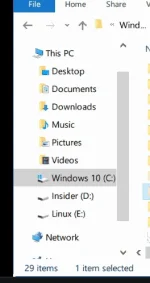 sa windows ko nawala kasi