 PH
PHIf you didn't fully understand just leave a question below and I will personally answer it

Here's the steps

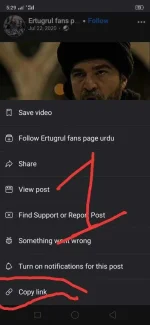
Step1: Find videos on Facebook and copy the link of the video you want to download
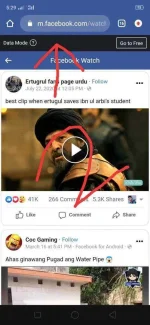
Step2: Paste the link of the video to the tab of any Browser you have on your device(take note that you must log in first your Facebook account to the Browser that you will use to download the said video)
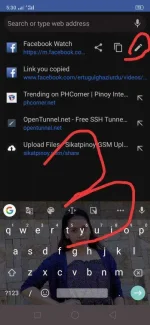
Step3: After you paste the link just click the tab of your browser and click the pencil button
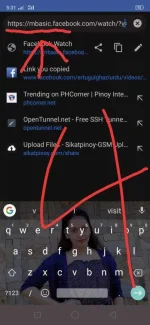
Step4: After you click the pencil button just edit the link and add "basic" between m.facebook.com .it should be like this
mbasic.facebook.com
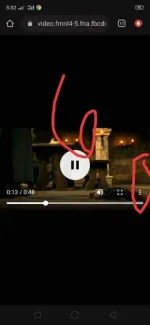
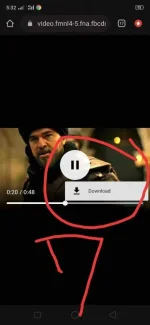
Step5: Your video was ready to download. Just click on the video and click the 3 vertical dots and your good to go !you may now Download the video

See pictures below if you didn't fully understand my text
7 pictures thousands of ideas

Attachments
-
 IMG_20210319_174251.webp42.1 KB · Views: 118
 -
 IMG_20210319_174303.webp75.4 KB · Views: 98
 -
 IMG_20210319_174316.webp75 KB · Views: 99
 -
 IMG_20210319_174330.webp77.4 KB · Views: 102
 -
 IMG_20210319_174354.webp98.7 KB · Views: 97
 -
 IMG_20210319_174409.webp25.9 KB · Views: 99
 -
 IMG_20210319_174421.webp30.3 KB · Views: 102


 thanks
