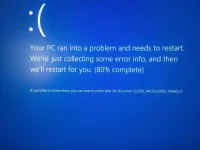
🔒 Closed Pa help nman po mga sir. (BSOD)

Status
Not open for further replies.

-FlySolo-

Enthusiast
Nag gaganto nlng po sya bigla. Thanks in advance po sa mga sagot. 😁
 

Attachments

  • 5354CCD9-C1CE-4343-9E23-25A61D14AE03.webp
    5354CCD9-C1CE-4343-9E23-25A61D14AE03.webp
    256.6 KB · Views: 27
Did you overclock your system?


I have had this issue a few times before. From all of my research, it is caused by a lot of things. The three largest causes I have come across that affected me are

  • dying CPU (you probably overclocked it and fried it or forgot to clean the fan, happened to my laptop with poor cooling)
  • Bad drivers or motherboard BIOS firmware. Try updating all your drivers and updating your motherboard BIOS firmware
  • Bad overclock configuration. If you are letting your motherboard auto configure your overclock (I know my ASUS motherboard can do this), see the above point about motherboard BIOS. I had some issues overclocking once I updated to Windows 10. Update my BIOS firmware fixed it


    source:
 
[XX='-FlySolo-, c: 949314, m: 1731950'][/XX] Kalimitan faulty yung mobo or may na-galaw ka ata na parts kaya nagkakaganyan.


Have you tried FULL re-install ulit ng Windows?
 
Status
Not open for further replies.

Similar threads

About this Thread

  • 4
    Replies
  • 258
    Views
  • 2
    Participants
Last reply from:
Kentify

Trending Topics

Online now

Members online
1,019
Guests online
1,051
Total visitors
2,070

Forum statistics

Threads
2,277,203
Posts
28,974,925
Members
1,229,765
Latest member
tantan0210
Back
Top