 PH
PHOverview of Office Tool Plus 8 Benefits
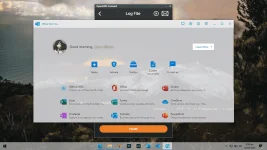
- Configure the Office installation, as well as customize the installed C2R products, such as adding and removing components, language packs, etc.
- Download the Office installation package or the language pack, which can be downloaded using the official programs Thunder, Aria or Microsoft.
- Configure your current Office, change the update channel, delete the product language, or delete the product, or use the built-in scripts or tools to clean the Office
- Activate your office. Easily set the product key and configure your KMS server address or convert the Office version. (PS: the tool does not have a built-in KMS activation, it simply provides the ability to configure a KMS server.)
Overview of Office Tool Plus 8 Features
- MS Office 2016 -> Standard, Pro Plus, Mondo, Professional, Personal, Home Business, Home Student, O365 ProPlus, O365 Business, O365 Small Business, O365 Home Premium
- MS Office 2019 -> Standard, Pro Plus, Professional, Standard 2019 Volume, ProPlus 2019 Volume, Office 365, Home Business, Home Student
Technical Details and System Requirements
- Supported OS: Windows 7/8/10
- Processor: Pentium IV or higher
- RAM: 1 GB RAM (2 GB recommended)
- Free Hard Disk Space: 200 MB or more
© FileCr
You do not have permission to view the full content of this post. Log in or register now.


