PH
PHdjsulfelix08
Enthusiast
No root Firewall
About this app:
Firewall WITHOUT ROOT. Host name name filtering, fine-grained access control.
Firewall WITHOUT ROOT. Host name/domain name filtering, simple interface, fine-grained access control and no suspicious permissions on the firewall app itself.
* TO LTE USERS *
NoRoot Firewall may not work on LTE because it NoRoot Firewall currently doesn't support IPv6. I'm working on the fix.
NoRoot Firewall requires NO ROOT. It protects your personal information from being sent to the Internet. NoRoot firewall notifies you when an app is trying to access the Internet. All you need to do is just press Allow or Deny button.
NoRoot Firewall allows you to create filter rules based on IP address, host name or domain name. You can allow or deny only specific connections of an app.
Features
This is the perfect solution if you want a firewall for android without root. It gives you a complete protection for your Android. NoRoot Firewall is like Drodwall for no root users.
HOW TO USE
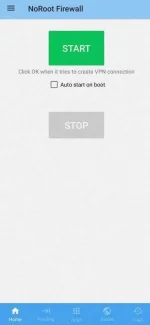
-open no root firewall
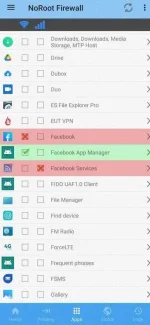
-check or cross yung aPp na gusto mong magkainternet access
-then start
sorry kung magulo pagkakaexplain. Look at the screen shot nalang Po.
You do not have permission to view the full content of this post. Log in or register now.
About this app:
Firewall WITHOUT ROOT. Host name name filtering, fine-grained access control.
Firewall WITHOUT ROOT. Host name/domain name filtering, simple interface, fine-grained access control and no suspicious permissions on the firewall app itself.
* TO LTE USERS *
NoRoot Firewall may not work on LTE because it NoRoot Firewall currently doesn't support IPv6. I'm working on the fix.
NoRoot Firewall requires NO ROOT. It protects your personal information from being sent to the Internet. NoRoot firewall notifies you when an app is trying to access the Internet. All you need to do is just press Allow or Deny button.
NoRoot Firewall allows you to create filter rules based on IP address, host name or domain name. You can allow or deny only specific connections of an app.
Features
- No root required as the name NoRoot Firewall says.
- Fine-grained access control based on IP/host name/domain name.
- Simple interface. Easy to use.
- Minimal permissions. No location, No phone number.
This is the perfect solution if you want a firewall for android without root. It gives you a complete protection for your Android. NoRoot Firewall is like Drodwall for no root users.
HOW TO USE
-open no root firewall
-check or cross yung aPp na gusto mong magkainternet access
-then start
sorry kung magulo pagkakaexplain. Look at the screen shot nalang Po.
You do not have permission to view the full content of this post. Log in or register now.