 PH
PHPHC - GLORIOUS
Eternal Poster
UPDATE 8: https://phcorner.org/threads/update...-id-uk-nl-ru-fr-ge-vip-server-7-days.1051175/
UPDATE 7:
KUMUSTA MGA LODS!
Wla po tayo Indonesia server ngayon kasi d ako nakaabot kaya California server muna pinalit ko. No Speed Cap and 7 days validity. Enjoy mga lods!
Here are the links:
 GE
GE
You do not have permission to view the full content of this post. Log in or register now.
 FR
FR
You do not have permission to view the full content of this post. Log in or register now.
 US
US
You do not have permission to view the full content of this post. Log in or register now.
 NL
NL
You do not have permission to view the full content of this post. Log in or register now.
 SG
SG
You do not have permission to view the full content of this post. Log in or register now.
 CA
CA
You do not have permission to view the full content of this post. Log in or register now.
 RU
RU
You do not have permission to view the full content of this post. Log in or register now.
 UK
UK
You do not have permission to view the full content of this post. Log in or register now.
 JP
JP
You do not have permission to view the full content of this post. Log in or register now.
 KR
KR
You do not have permission to view the full content of this post. Log in or register now.
For Established:
 TUTORIAL:
 LINK: You do not have permission to view the full content of this post.
Log in or register now.
LINK: You do not have permission to view the full content of this post.
Log in or register now.
Refer to this Thread when changing language after installation: Changing Language to ENG
HOW TO IMPORT?
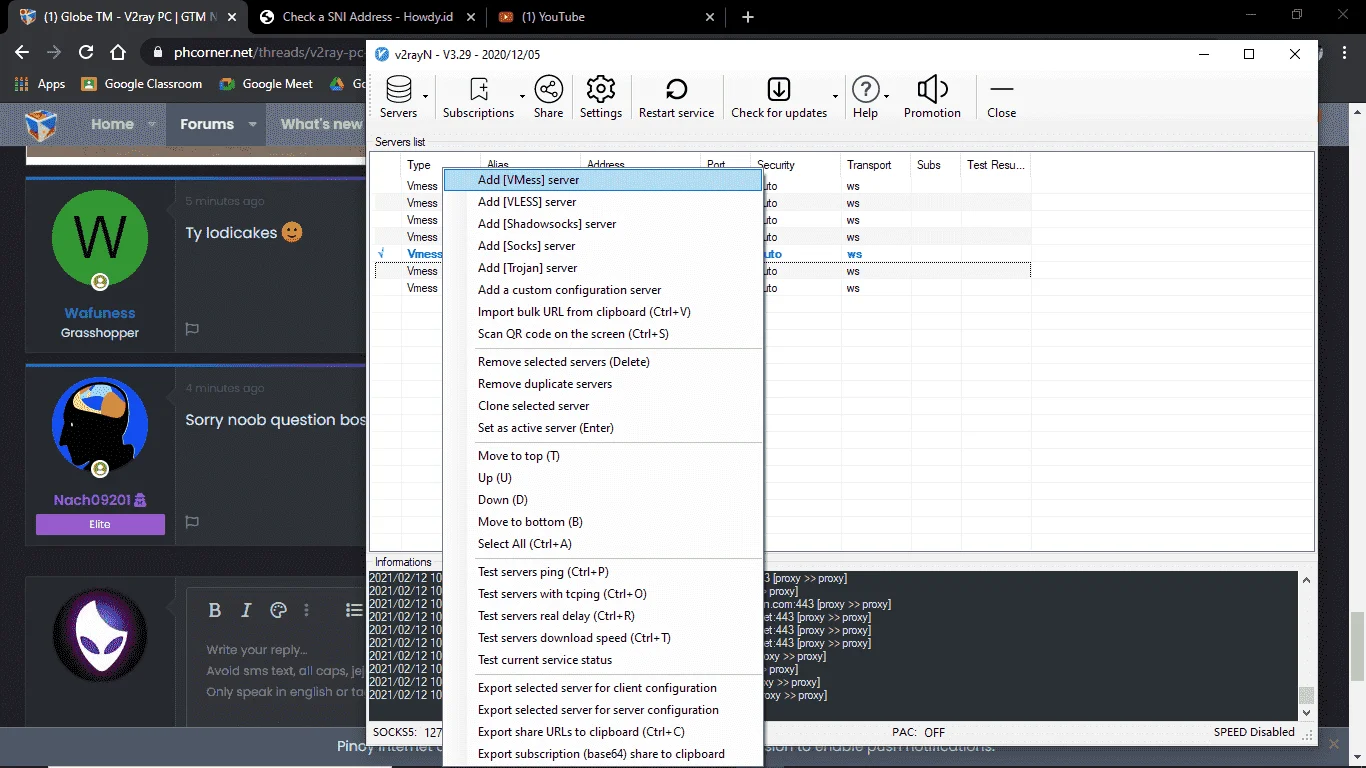
Sa V2ray mo po lods click mo yung "Server". Then, "Add [VMess] server". (See image below)
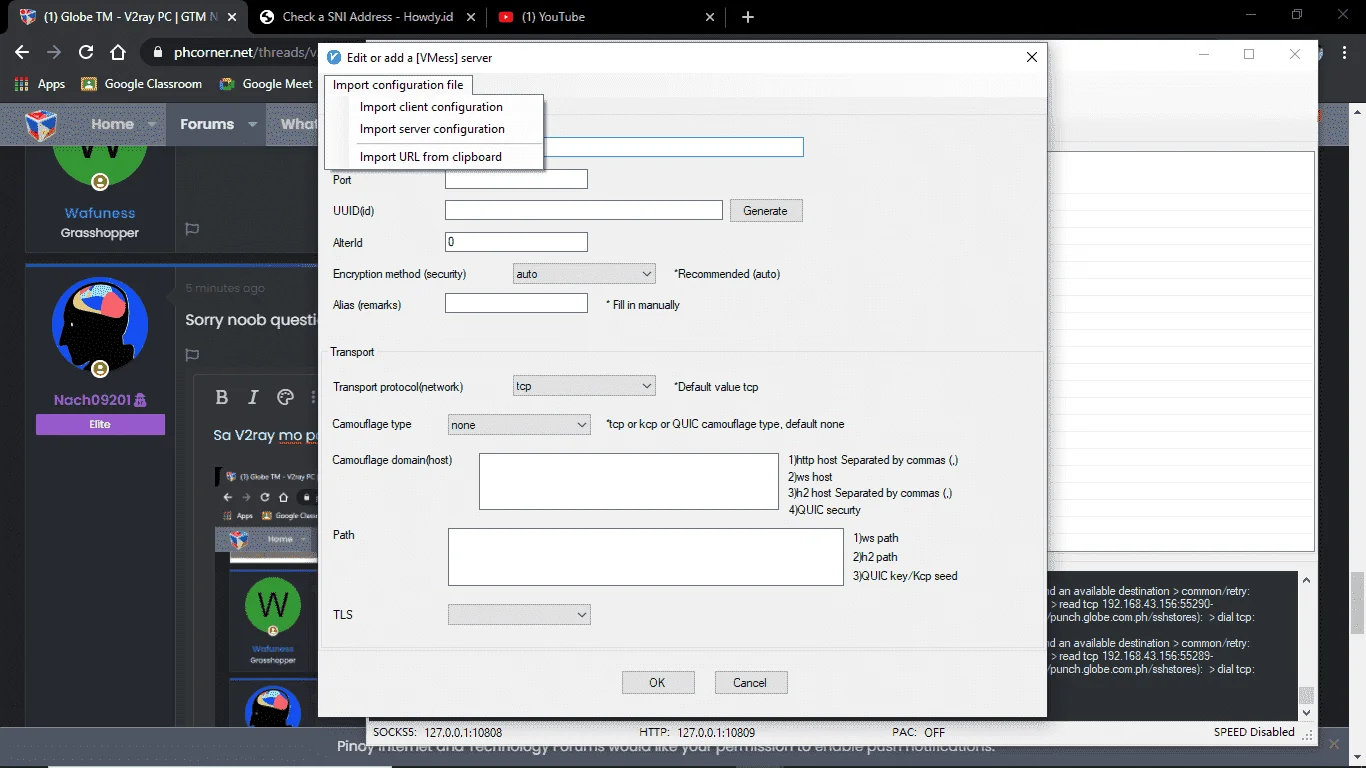
Tapos may mag pop-up jan after click. Sa Upper-Right nun click mo yung "Import Configuration File". Then sa drop-down menu click mo yung "Import Client Configuration". (See image below)
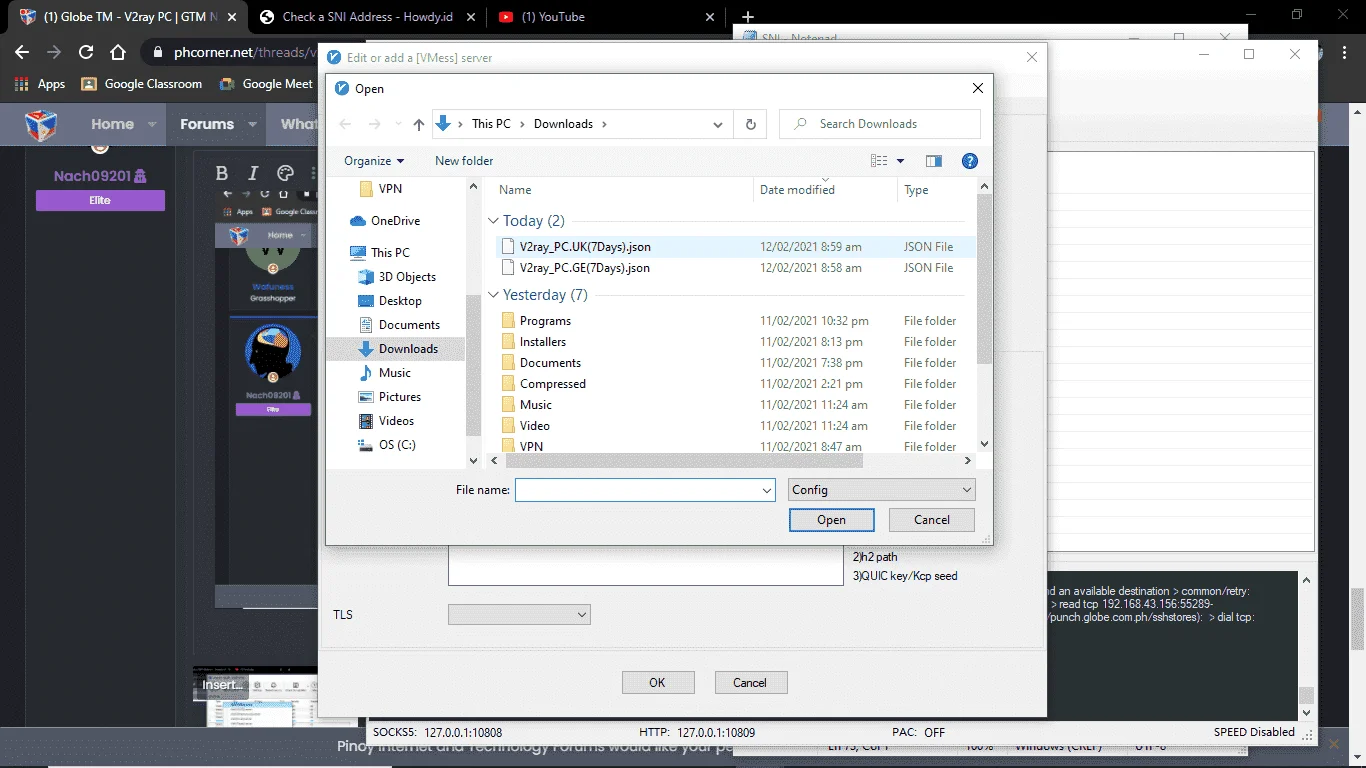
May mag pop-up ulit na window nian. Then hanapin mo na dun yung file na dinownload mo na galing sa kin. (See image below)
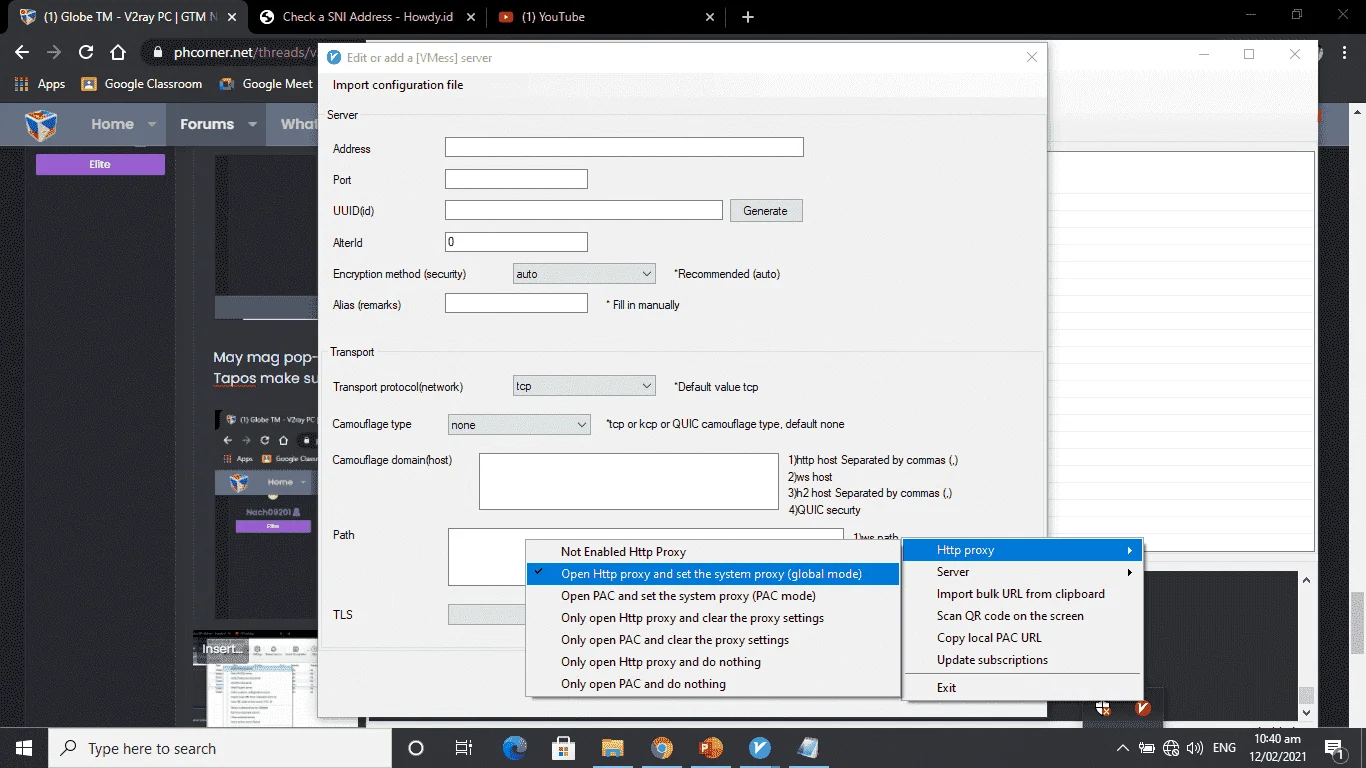
Then make sure na nka "Global Mode" or "Set the System Proxy" ang HTTP Proxy. (See image below
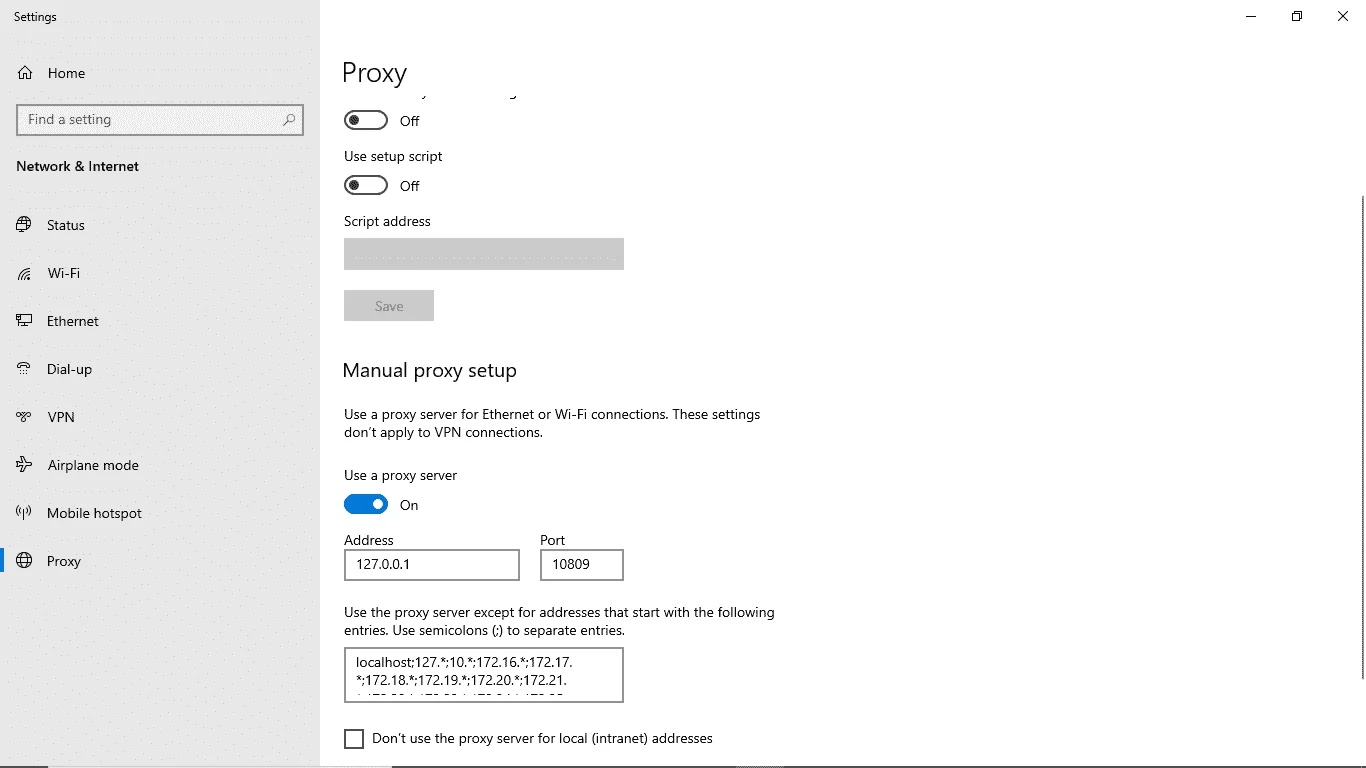
*If ever na hindi man connecting check your "PC's MANUAL PROXY SETTING". Dapat naka set ng ganito. sa baba. (Copy nio and refer to the image below). Feeling ko lng kasi may effect din to pra mag work ang config.
ON - Use a Proxy Server
Address:
127.0.0.1
Port:
10809
Nkalagay sa Textbox na malaki:
localhost;127.;10.;172.16.;172.17.;172.18.;172.19.;172.20.;172.21.;172.22.;172.23.;172.24.;172.25.;172.26.;172.27.;172.28.;172.29.;172.30.;172.31.;192.168.*
UPDATE 7:
KUMUSTA MGA LODS!
Wla po tayo Indonesia server ngayon kasi d ako nakaabot kaya California server muna pinalit ko. No Speed Cap and 7 days validity. Enjoy mga lods!
Here are the links:
GEYou do not have permission to view the full content of this post. Log in or register now.
FRYou do not have permission to view the full content of this post. Log in or register now.
USYou do not have permission to view the full content of this post. Log in or register now.
NLYou do not have permission to view the full content of this post. Log in or register now.
SGYou do not have permission to view the full content of this post. Log in or register now.
CAYou do not have permission to view the full content of this post. Log in or register now.
RUYou do not have permission to view the full content of this post. Log in or register now.
UKYou do not have permission to view the full content of this post. Log in or register now.
JPYou do not have permission to view the full content of this post. Log in or register now.
KRYou do not have permission to view the full content of this post. Log in or register now.
For Established:
Spoiler contents are visible only to Established Members.
TUTORIAL:LINK: You do not have permission to view the full content of this post.
Log in or register now.Refer to this Thread when changing language after installation: Changing Language to ENGHOW TO IMPORT?
Sa V2ray mo po lods click mo yung "Server". Then, "Add [VMess] server". (See image below)
Tapos may mag pop-up jan after click. Sa Upper-Right nun click mo yung "Import Configuration File". Then sa drop-down menu click mo yung "Import Client Configuration". (See image below)
May mag pop-up ulit na window nian. Then hanapin mo na dun yung file na dinownload mo na galing sa kin. (See image below)
Then make sure na nka "Global Mode" or "Set the System Proxy" ang HTTP Proxy. (See image below
*If ever na hindi man connecting check your "PC's MANUAL PROXY SETTING". Dapat naka set ng ganito. sa baba. (Copy nio and refer to the image below). Feeling ko lng kasi may effect din to pra mag work ang config.
ON - Use a Proxy Server
Address:
127.0.0.1
Port:
10809
Nkalagay sa Textbox na malaki:
localhost;127.;10.;172.16.;172.17.;172.18.;172.19.;172.20.;172.21.;172.22.;172.23.;172.24.;172.25.;172.26.;172.27.;172.28.;172.29.;172.30.;172.31.;192.168.*

