PH
PHCreate SHUTDOWN shortcut
Right click on an empty area on your desktop. Select New > Shortcut.
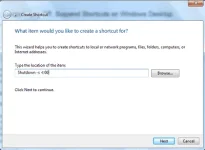
In the first box of the Create Shortcut Wizard, type : Shutdown -s -t 00.
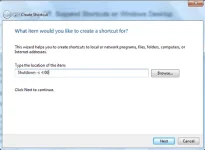
Click Next. Name the shortcut: Shutdown , and click Finish.
Then select an appropriate icon for it!
To give it inicon, right-click on the newly created shortcut > Properties > Shortcut tab > Change Icon button. Select one from the system icons or browse to the icon of your choice and click OK.
Right click on an empty area on your desktop. Select New > Shortcut.
In the first box of the Create Shortcut Wizard, type : Shutdown -s -t 00.
Click Next. Name the shortcut: Shutdown , and click Finish.
Then select an appropriate icon for it!
To give it inicon, right-click on the newly created shortcut > Properties > Shortcut tab > Change Icon button. Select one from the system icons or browse to the icon of your choice and click OK.

 wc sa lahat