 PH
PHrequirments:
PC[android emulator]
-high spec pc recommended, para d laggy
pyhton 3.8
IDLE python
Tutorial:
1. need mo syempre ma capture yung location ng target mo.
ex. 4 cards yan. so dapat 4 din target mo.
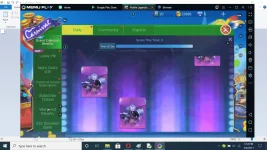
2. need mo ng alay na account/dummy acc.
kasi mag trial and error ka.
pero may technique tayo diyan.
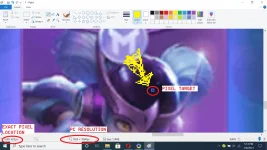
3. using paint, makikita mo exact location ng target na pixel.
==================================
INSTALLING PYTHON:
type sa cmd(administration):
pip install pywin32
pip install keyboard
pip install pyautogui
pip install opencv-python
open IDLE (Python 3.8) depende sa version mo.
and create new file.
copy and paste
============================================
from pyautogui import *
import pyautogui
import time
import keyboard
import random
import win32api, win32con
time.sleep(2)
def click(x,y):
win32api.SetCursorPos((x,y))
win32api.mouse_event(win32con.MOUSEEVENTF_LEFTDOWN,0,0)
time.sleep(0.01) #time interval ng script
win32api.mouse_event(win32con.MOUSEEVENTF_LEFTUP,0,0)
while keyboard.is_pressed('q') == False: #hotkey para ma stop ang script
# eto yung sample ng location tartget kong pixel
# if pyautogui.pixel(x-coordinate, y-coordinate)
# [0] = red, [1] = green, [2] = blue
# == [ibig sabihin neto, kung ang [0] ay "equal" 255 ]
# 255: [RGB color value]
# if argument is true, automatic niyang i-click yung card.
if pyautogui.pixel(723, 814)[0] == 255:
click(723, 814)
if pyautogui.pixel(989, 814)[0] == 255:
click(989, 814)
if pyautogui.pixel(1255, 814)[0] == 255:
click(1255, 814)
if pyautogui.pixel(1536, 814)[0] == 255:
click(1536, 814)
========================================
pano makukuha yung RGB color value?
Open IDLE python
type:
import pyautogui
<press enter>
pyautogui.displayMousePosition()
<press enter>
automatic na makukuha yung RGB color value ng target mong pixel.
===========================================
pag okay na lahat save and press F5.
start mo na yung grand collection event.
may possible na masira yung script. lalo na pag low specs pc mo. same ng sakin.
PC[android emulator]
-high spec pc recommended, para d laggy
pyhton 3.8
IDLE python
Tutorial:
1. need mo syempre ma capture yung location ng target mo.
ex. 4 cards yan. so dapat 4 din target mo.
2. need mo ng alay na account/dummy acc.
kasi mag trial and error ka.
pero may technique tayo diyan.
3. using paint, makikita mo exact location ng target na pixel.
==================================
INSTALLING PYTHON:
type sa cmd(administration):
pip install pywin32
pip install keyboard
pip install pyautogui
pip install opencv-python
open IDLE (Python 3.8) depende sa version mo.
and create new file.
copy and paste
============================================
from pyautogui import *
import pyautogui
import time
import keyboard
import random
import win32api, win32con
time.sleep(2)
def click(x,y):
win32api.SetCursorPos((x,y))
win32api.mouse_event(win32con.MOUSEEVENTF_LEFTDOWN,0,0)
time.sleep(0.01) #time interval ng script
win32api.mouse_event(win32con.MOUSEEVENTF_LEFTUP,0,0)
while keyboard.is_pressed('q') == False: #hotkey para ma stop ang script
# eto yung sample ng location tartget kong pixel
# if pyautogui.pixel(x-coordinate, y-coordinate)
# [0] = red, [1] = green, [2] = blue
# == [ibig sabihin neto, kung ang [0] ay "equal" 255 ]
# 255: [RGB color value]
# if argument is true, automatic niyang i-click yung card.
if pyautogui.pixel(723, 814)[0] == 255:
click(723, 814)
if pyautogui.pixel(989, 814)[0] == 255:
click(989, 814)
if pyautogui.pixel(1255, 814)[0] == 255:
click(1255, 814)
if pyautogui.pixel(1536, 814)[0] == 255:
click(1536, 814)
========================================
pano makukuha yung RGB color value?
Open IDLE python
type:
import pyautogui
<press enter>
pyautogui.displayMousePosition()
<press enter>
automatic na makukuha yung RGB color value ng target mong pixel.
===========================================
pag okay na lahat save and press F5.
start mo na yung grand collection event.
may possible na masira yung script. lalo na pag low specs pc mo. same ng sakin.