 PH
PH-
Welcome to PHCorner Forums! Sign up for free to unlock full access and exclusive privileges, including:
- Asking questions about computer and mobile issues
- Discovering internet tips for your mobile network and computer
You are using an out of date browser. It may not display this or other websites correctly.
You should upgrade or use an alternative browser.
You should upgrade or use an alternative browser.
Hi2ulive is closed
- Thread starter hi2u
- Start date
- Status
- Not open for further replies.
erwinmagbero
Enthusiast
Salamat po TS, sa FB group nakita ko nashare yung link nyo dati.
Laking tulong always. Thanks po
Laking tulong always. Thanks po
mars_speed
Established
[XX='arsenal1205, c: 845271, m: 1107779'][/XX] saan po yung link? pasensya na po
[XX='arsenal1205, c: 845271, m: 1107779'][/XX] saan po yung input stream?
[XX='arsenal1205, c: 845271, m: 1107779'][/XX] saan po yung input stream?
PatrickNickolas99
Honorary Poster
Khit hindi gumagana ung HBO.
Thank you so much parin po dito
Thank you so much parin po dito
westside03
Fanatic
salamat ng marami master. keep sharing
arsenal1205
Rarely opens PHC
[HIDEUSER@1830694..Step 1: Select settings from the Kodi menu@arsenal1205..saan po yung link? pasensya na po
@arsenal1205..saan po yung input stream?
@IMG..alt="1614351631025.png"]https://phcorner.org/attachments/1614351631025-png.1319049/[/IMG]
Step 2: Select add ons
@IMG..alt="1614351648540.png"]https://phcorner.org/attachments/1614351648540-png.1319050/[/IMG]
Step 3: Select install from repository
@IMG..alt="1614351666906.png"]https://phcorner.org/attachments/1614351666906-png.1319051/[/IMG]
Step 4: Select Kodi addon repository
@IMG..alt="1614351677218.png"]https://phcorner.org/attachments/1614351677218-png.1319052/[/IMG]
Step 5: Select VideoPlayer Inputstream
@IMG..alt="1614351693572.png"]https://phcorner.org/attachments/1614351693572-png.1319053/[/IMG]
Step 6: Select InputStream Adaptive and install it
@IMG..alt="1614351703744.png"]https://phcorner.org/attachments/1614351703744-png.1319054/[/IMG]
Without following this step most streams will not work. The next instructions are in the hidden section.
To use this playlist you must also install iptv simple addon for Kodi.
Step 1: Select settings from Kodi menu
@IMG..alt="1614352405952.png"]https://phcorner.org/attachments/1614352405952-png.1319066/[/IMG]
Step 2: Select Addons
@IMG..alt="1614352418110.png"]https://phcorner.org/attachments/1614352418110-png.1319068/[/IMG]
Step 3: Select Install from repository
@IMG..alt="1614352438102.png"]https://phcorner.org/attachments/1614352438102-png.1319069/[/IMG]
Step 4: Select Kodi addon repository
@IMG..alt="1614352445168.png"]https://phcorner.org/attachments/1614352445168-png.1319070/[/IMG]
Step 5: Select PVR Clients
@IMG..alt="1614352454170.png"]https://phcorner.org/attachments/1614352454170-png.1319071/[/IMG]
Step 6: Select PVR IPTV Simple Client. Install it
@IMG..alt="1614352462436.png"]https://phcorner.org/attachments/1614352462436-png.1319072/[/IMG]
@IMG..alt="1614352469621.png"]https://phcorner.org/attachments/1614352469621-png.1319073/[/IMG]
Step 7: After the install is completed select PVR IPTV Simple Client again. Select configure.
@IMG..alt="1614352478870.png"]https://phcorner.org/attachments/1614352478870-png.1319075/[/IMG]
Step 8: Select M3U Play List URL and enter
Code:
@URL..https://entertainment.piko.vip/temp.m3u[/URL]
press ok. It will say needs to restart.
@IMG..alt="1614352492140.png"]https://phcorner.org/attachments/1614352492140-png.1319076/[/IMG]
When you restart Kodi you will see TV in your menu. Select it and select channels. Enjoy your free TV
[/HIDEUSER]

-Plastic Foods-
Established
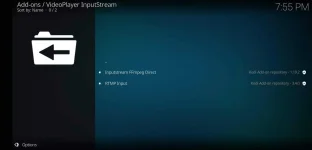 alin gmit nyo dito sa dalawa mga lods?
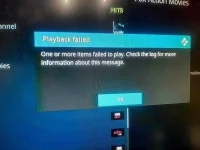
nasubukan ko n yang 2 hndi lumalabas yung mga channel
Inputstream Adaptive lodsView attachment 1320151alin gmit nyo dito sa dalawa mga lods?
nasubukan ko n yang 2 hndi lumalabas yung mga channel
It's not in the repository because it's automatically installed in android. Look in your installed addons instead.alin gmit nyo dito sa dalawa mga lods?
nasubukan ko n yang 2 hndi lumalabas yung mga channel
- Status
- Not open for further replies.
Similar threads
About this Thread
-
2KReplies
-
63KViews
-
633Participants
Last reply from:
kawaiishiella
kawaiishiella
New Topics
-
Filipino movies online
- Started by Moop11
- Replies: 0
- 📽️ Video Streaming
-
Non-VPN Hits (5)
- Started by jennie_
- Replies: 1
- 📽️ Video Streaming
-
Apsat TV Channels
- Started by VedmidDubai
- Replies: 0
- 📽️ Video Streaming
-
IPTV Mix Servers m3u Playlist 260x 10-20-26
- Started by BossHabibi
- Replies: 1
- 📽️ Video Streaming
-
Roch PH Channels
- Started by Toobee
- Replies: 6
- 📽️ Video Streaming
-
Canal FUBO SPORTS
- Started by roca1995
- Replies: 2
- 📽️ Video Streaming
-
Mac list 0ct 19
- Started by CodeCraftsman
- Replies: 4
- 📽️ Video Streaming
-
Benfica TV multicams and international channels
- Started by a61431082
- Replies: 4
- 📽️ Video Streaming
Trending Topics
Online now
- Members online
- 1,221
- Guests online
- 10,980
- Total visitors
- 12,201