PH
PHmrpeanutbutter
Eternal Poster
Kailangan ata dito naka MIUI 12 at Android 10 ka, I'm not sure pero try nyo na lang.
Steps
1. Install Activity Launcher
You do not have permission to view the full content of this post. Log in or register now.
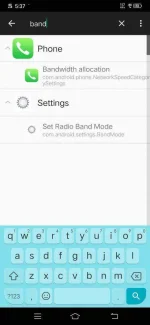
2. Open the Activity Launcher app, search 'band' and then click the Set Radio Band Mode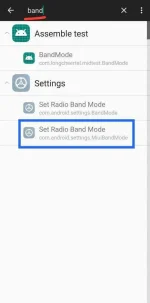
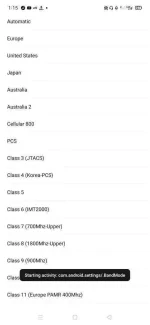
3. Scroll down to the bottom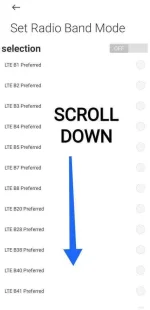
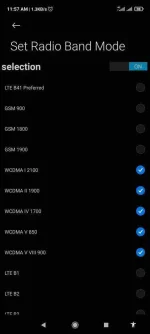
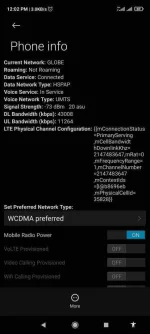
4. Select the best band in your area (hindi blackpink)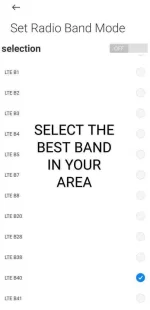
5. Then switch on the selection.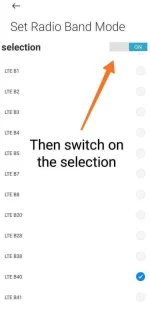
It may take 30 seconds para gumana.
Baka mareset yung settings pag in-airplane mode nyo kaya hintay nalang.
SOURCE: You do not have permission to view the full content of this post. Log in or register now.
Steps
1. Install Activity Launcher
You do not have permission to view the full content of this post. Log in or register now.
2. Open the Activity Launcher app, search 'band' and then click the Set Radio Band Mode
3. Scroll down to the bottom
4. Select the best band in your area (hindi blackpink)
5. Then switch on the selection.
It may take 30 seconds para gumana.
Baka mareset yung settings pag in-airplane mode nyo kaya hintay nalang.
SOURCE: You do not have permission to view the full content of this post. Log in or register now.