PH
PHMga ehi maker pasok
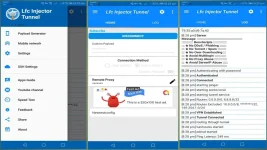
LFC INJECTOR tunnel V1.1. 1 26
How to import ?
Punta kalang sa upper right at may makita ka dyan na 3 dots click mo yan tapus click mo yung "import/export " tapus click ulit yung "import Configuration " then punta sa download then Click yung download mo na config..
Pleased Don't ' use îllégâl Activities ,,,,
 Torrents
Carding
häçking
Good For ?
 Good For downloading big files Then connect
ρáíd server (but for free to use)
Unknown Expiry untili serve down
Enjoy dont forget to feedback mga lods
Open for all
Download here:
LFC INJECTOR tunnel V1.1. 1 26
Link
You do not have permission to view the full content of this post. Log in or register now.
Lfc config here: Unknown expire
 FB10 & ML10 [TNT &TM]
GIGA GAMES
Lfc Config files
You do not have permission to view the full content of this post. Log in or register now.
Whats New
"Improvement" App speed and bug fixes
About this app
VPN app to browse the internet privately & securely with multiple tunnel tech
LFC INJECTOR tunnel v1.1. 1 26
is a professional VPN tool to browse the Internet privately and securely with multiple protocol and tunneling technologies build into one app
It works as an universal SSH/Proxy Tunnel/DNS Forwarding/Socks client to encrypts your connection so that you can surf the internet privately and securely. Besides that, it also help you access blocked websites behind firewall.
Best part? You are able to configure your own server and connect using this app.
PLEASE READ DESCRIPTION BEFORE YOU DOWNLOAD
This tools is for professional users only
Access any website and service on the Internet and secure your identity. Secure your Android device from häçkers and online threats when using a public
Features:
- Secure your connection using SSH or
socks tunnel
Tunnel Types
How to use:
LFC INJECTOR tunnel V1.1. 1 26
How to import ?
Punta kalang sa upper right at may makita ka dyan na 3 dots click mo yan tapus click mo yung "import/export " tapus click ulit yung "import Configuration " then punta sa download then Click yung download mo na config..
Pleased Don't ' use îllégâl Activities ,,,,
Torrents Carding häçkingGood For ?
Good For downloading big files Then connect ρáíd server (but for free to use) Unknown Expiry untili serve downEnjoy dont forget to feedback mga lods
Open for all
Download here:
LFC INJECTOR tunnel V1.1. 1 26
Link
You do not have permission to view the full content of this post. Log in or register now.
Lfc config here: Unknown expire
FB10 & ML10 [TNT &TM] GIGA GAMESLfc Config files
You do not have permission to view the full content of this post. Log in or register now.
Whats New
"Improvement" App speed and bug fixes
About this app
VPN app to browse the internet privately & securely with multiple tunnel tech
LFC INJECTOR tunnel v1.1. 1 26
is a professional VPN tool to browse the Internet privately and securely with multiple protocol and tunneling technologies build into one app
It works as an universal SSH/Proxy Tunnel/DNS Forwarding/Socks client to encrypts your connection so that you can surf the internet privately and securely. Besides that, it also help you access blocked websites behind firewall.
Best part? You are able to configure your own server and connect using this app.
PLEASE READ DESCRIPTION BEFORE YOU DOWNLOAD
This tools is for professional users only
Access any website and service on the Internet and secure your identity. Secure your Android device from häçkers and online threats when using a public
Features:
- Secure your connection using SSH or
socks tunnel
- No root needed
- DNS Forwarding
- Build in SSH client
- Payload Generator
- Apps Filter
- Support Android 9
- DNS forwarding
- Dark mode
- Udp forwarding
Tunnel Types
- HTTP Proxy + SSH
- SSH direct
- socks(5)
- DNS forwarding
- Exported config is encrypted
- Lock and protect the settings from users
- Set custom message for customer
- Lock root phone
- Set date expire config
How to use:
orImport config file created by other users (You can find it in your local group/group chats)
Open payload generator and press generate (no need to adjust settings) and select one of our server to connect