 PH
PH*Siguro marami na rin nakakaalam nito, pero sa mga hindi nakakaalam..


1st, provide vpn na pwede mag set up ng "DNS Forwarding"
anong vpn ba tinutukoy ko?
- mga modded vpn (since first consume ang priority natin habang unstable pa no load ng mga master)
- http-injector
- SocksHTTP, and many more pa!
*basta supported ng "DNS Forwarding"
2nd, clear the dns inside forward dns (kung meron man) and then input this:
then leave it a check✓ ofc.
And lastly, connect mo na! and now, feel the absence of annoying scum ads!
here's are my proof:
vpn na ginamit ko with photo:
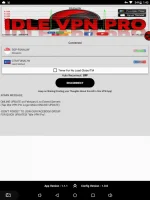
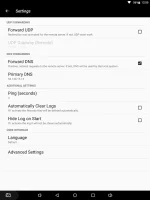
- - - - Idle VPN Pro: (credits sa may ari niyan hihi)
You do not have permission to view the full content of this post. Log in or register now.
this m you can also check this and explore more:
You do not have permission to view the full content of this post. Log in or register now.
MARAMING SALAMAT!
Pwede natin gamitin ang DNS pang block ng mga annoying ads,
tracking, and phishing!
just by using our VPN!
Na-diskubre ko lang to ngayong gabi, at nag search muna ako before ko gawin. At yun nga! NAPAKA EPEKTIBtracking, and phishing!
just by using our VPN!
1st, provide vpn na pwede mag set up ng "DNS Forwarding"
anong vpn ba tinutukoy ko?
- mga modded vpn (since first consume ang priority natin habang unstable pa no load ng mga master)
- http-injector
- SocksHTTP, and many more pa!
*basta supported ng "DNS Forwarding"
2nd, clear the dns inside forward dns (kung meron man) and then input this:
*kahit hindi na dns.AdGuard.com , it won't work maybe(kase ilang beses ko na sinubukan puro cdc tuloytuloy— but you can try it on ur own94.140.15.15 (for default adblocking) or 94.140.15.16 (for default features with blocking ãdül† sites)
then leave it a check✓ ofc.
And lastly, connect mo na! and now, feel the absence of annoying scum ads!
here's are my proof:
vpn na ginamit ko with photo:
- - - - Idle VPN Pro: (credits sa may ari niyan hihi)
You do not have permission to view the full content of this post. Log in or register now.
this m you can also check this and explore more:
You do not have permission to view the full content of this post. Log in or register now.
MARAMING SALAMAT!

 pero tuwing magcconnect ang nklagay PHC-eftabs