PH
PHmikemika09
Forum Veteran
Sa mga need ng Scrib account dyan , this tutorial is using cookies only.
Eto po ay ginagamit ko until now galing po ito sa Mobilarian
una download nyo yung extension para sa browser nyo . then install the extension .
after nyo ma download yung extension is punta na kayo dun sa site ng scribd.com.
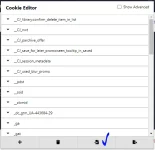
then sa gilid ng URL bar click nyo yung Cookie-Editor (extension).
after that click nyo yung import buton.
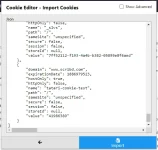
then i paste nyo yung link na ibibigay ko (naka txt file)
after that click nyo ulit yung import button. then ok na yan..
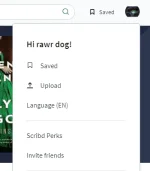
just refresh the page para mag effect yung cookies..
Then pwede nyo na idownload lahat ng files na gusto nyo.
Extension
For Google Chrome Click You do not have permission to view the full content of this post. Log in or register now.
For FireFox Click You do not have permission to view the full content of this post. Log in or register now.
Download Text File
You do not have permission to view the full content of this post. Log in or register now.
Eto po ay ginagamit ko until now galing po ito sa Mobilarian
una download nyo yung extension para sa browser nyo . then install the extension .
after nyo ma download yung extension is punta na kayo dun sa site ng scribd.com.
then sa gilid ng URL bar click nyo yung Cookie-Editor (extension).
after that click nyo yung import buton.
then i paste nyo yung link na ibibigay ko (naka txt file)
after that click nyo ulit yung import button. then ok na yan..
just refresh the page para mag effect yung cookies..
Then pwede nyo na idownload lahat ng files na gusto nyo.
Extension
For Google Chrome Click You do not have permission to view the full content of this post. Log in or register now.
For FireFox Click You do not have permission to view the full content of this post. Log in or register now.
Download Text File
You do not have permission to view the full content of this post. Log in or register now.