🔒 Closed Increase Internal memory/RAM of your phone

Status
Not open for further replies.

hevlashka

Fanatic

  • ram-expander.webp

    Requirements>>>>
  • Rooted Android Device
  • Memory card
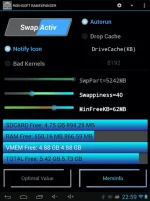
  • ROEHSOFT RAM-Expander
!!!!!!!!!!!!!!!!!!!!!!!!!!!!!!!!!!!!!!!!!!!!!!!!!!!!!!!!!!!!
Step 1: Your android device must be rooted.

Step 2:Download ROEHSOFT RAM-Expander app from You do not have permission to view the full content of this post. Log in or register now.and install it.

Step 3: Now open the app and enable SWAP Active to create a SWAP file.

Step 4: When it is finished, just click on the Grey Colored Box and activate the swap file created. After the process is finished, you will get this massage: “Congratulations you have successfully increased the RAM of your Android"


kung walang internet connection hindi lalabas un settings...black lang un application...
kapag na swap na ok kahit i off na ang internet connection..
 
Boss na try ko to ngayon, lahat ng app ko na transfer sa sd pero nag eerror na yung mga app ko hindi na ma open
 
Status
Not open for further replies.

About this Thread

  • 27
    Replies
  • 3K
    Views
  • 16
    Participants
Last reply from:
Unknown user

Trending Topics

Online now

Members online
1,238
Guests online
1,163
Total visitors
2,401

Forum statistics

Threads
2,271,716
Posts
28,937,587
Members
1,237,823
Latest member
saliopejs
Back
Top