 PH
PH-
Welcome to PHCorner Forums! Sign up for free to unlock full access and exclusive privileges, including:
- Asking questions about computer and mobile issues
- Discovering internet tips for your mobile network and computer
You are using an out of date browser. It may not display this or other websites correctly.
You should upgrade or use an alternative browser.
You should upgrade or use an alternative browser.
🔒 Closed Pa help po na corrupt os ko after kung mag boot sa usb ganto lumalabas
- Thread starter Chochoy
- Start date
- Status
- Not open for further replies.
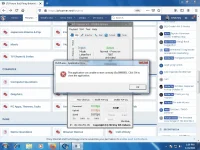
Fix Registry
Corrupt registry files lead to serious issues in the system including this error code. If you have a backup of your registry files, you can restore your system’s registry and fix the problem. However, modifying registry files is a bit complex and can be dangerous for the system. Any invalid or improper alteration can lead to serious system consequences. Therefore, backup your current registry files before making any change. To fix registry, perform the following steps:
Try mo lang lods!
Corrupt registry files lead to serious issues in the system including this error code. If you have a backup of your registry files, you can restore your system’s registry and fix the problem. However, modifying registry files is a bit complex and can be dangerous for the system. Any invalid or improper alteration can lead to serious system consequences. Therefore, backup your current registry files before making any change. To fix registry, perform the following steps:
- Press ‘Windows + R’, type regedit, and hit ‘Enter’
- Navigate to HKLM\SOFTWARE\Microsoft\Windows NT\CurrentVersion\Windows\AppInit_Dlls
- Double click LoadAppInit_DLLs and modify the value from 1 to 0
- Click ‘OK’ to confirm the changes
- Close the Registry Editor Window and restart the system
Try mo lang lods!
sige po lods try ko salamat poTry mo din mag System Restore
not working poFix Registry
Corrupt registry files lead to serious issues in the system including this error code. If you have a backup of your registry files, you can restore your system’s registry and fix the problem. However, modifying registry files is a bit complex and can be dangerous for the system. Any invalid or improper alteration can lead to serious system consequences. Therefore, backup your current registry files before making any change. To fix registry, perform the following steps:
Check if the error still pops up when you try to launch an application.
- Press ‘Windows + R’, type regedit, and hit ‘Enter’
- Navigate to HKLM\SOFTWARE\Microsoft\Windows NT\CurrentVersion\Windows\AppInit_Dlls
- Double click LoadAppInit_DLLs and modify the value from 1 to 0
- Click ‘OK’ to confirm the changes
- Close the Registry Editor Window and restart the system
Try mo lang lods!

yokzkidbest
Forum Veteran
tanggalin mo yung admin control sa registry editor mo mawawala yan
- Status
- Not open for further replies.
About this Thread
-
8Replies
-
319Views
-
5Participants
Last reply from:
yokzkidbest
yokzkidbest
New Topics
-
Tropic Colour - Sino meron nito?
- Started by mikehacker182
- Replies: 0
- ❓ Computer Discussion & Support
-
WINDOWS PRODUCT KEY
- Started by jhengky22
- Replies: 0
- ❓ Computer Discussion & Support
-
Request : 2027 calendars with Holidays
- Started by the_jinx
- Replies: 0
- ❓ Computer Discussion & Support
-
Dapat ba akong maalarma dito? Nagback-up na paunti-unti ako.
- Started by Jeii
- Replies: 0
- ❓ Computer Discussion & Support
-
Realtek audio missing in device manager
- Started by PHC-MERCURIAL
- Replies: 4
- ❓ Computer Discussion & Support
-
Suggest OS para sa budget pc yung lightweight.
- Started by YourR3ze
- Replies: 2
- ❓ Computer Discussion & Support
-
Microsoft copilot personal
- Started by WEIRJD
- Replies: 0
- ❓ Computer Discussion & Support
-
Lock profile or browser?
- Started by heyhey
- Replies: 7
- ❓ Computer Discussion & Support
-
Light/Gaming OS for 4 year old laptop
- Started by Genesis Storm
- Replies: 10
- ❓ Computer Discussion & Support
-
HWID SPOOFER HELP!
- Started by Balisain
- Replies: 0
- ❓ Computer Discussion & Support
Trending Topics
Online now
- Members online
- 1,051
- Guests online
- 6,012
- Total visitors
- 7,063