 PH
PH
BEFORE YOU PROCEED YOU MUST HAVE THE FOLLOWING
BEFORE YOU PROCEED YOU MUST HAVE THE FOLLOWING
Mga Kailangan:
- Marunong mag antay (Pinaka Importante)
- PC/Laptop
- Gcash | (Fully Verified) | Must have balance 100 Gcash (Don't worry di mawawala 100 mo)
- AnyDesk | You do not have permission to view the full content of this post. Log in or register now.
- Paypal
- kailangan ng time and effort dito
- need mo 2-5hrs na naka bukas ang pc/laptop (one time lang naman pag i rurun na yung ads)
Instruction:
- Create American E×ρréšš Virtual Pay - Go to Gcash > Linked Account > Click American E×ρréšš > Enter your Gmail na gagamitin sa ads
- Link American E×ρréšš to Paypal - Go to Paypal > Bank and Cards > Add Credit Card > Enter Details of your Amex Card (CSC code can be found in Gcash > Open your Amex and Click "get new code" and wait for the sms) note: need ng atleast 100gcash balance para malink, di naman mawawala yung 100 mo.
- Download AnyDesk -You do not have permission to view the full content of this post. Log in or register now.
- Set Password on your AnyDesk - Open Anydesk > Click Set Password > Set this Password : keyboard24
- Done - Since bawal ang "pm me" dito. Kindly comment nalang kung interested ka, then pa Hide User nalang ng Contact info mo i prefer FB
- Setup -After ma Setup, I rereview payan if Eligible then kung Eligible, i rurun napo yung ads
- Pag Success yung Run, May 1000 ka po
Ito yung flow natin:
1. SET UP
- dito po ung nilalagyan ng ads ung ads account.
2. CHECKING
- kapag "we currently ..." pa po ung nakalagay, under review pa po un
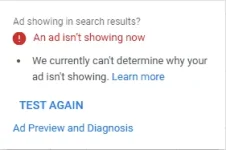
- kapag iba na ung nakalagay, pakita nyo po agad saken. baka po LIVE na.
3. LIVE
- eto po ung ngshoshow na si ads or eto po ung stage na pwede na irun si ads.
4. RUN
-dito mo po need iopen si pc.anydesk at si ads account from 9:30pm to 5am. (or depende kung what time matapos si run)
5. PAYOUT
- kapag success/good run
not accepting anymore, nakaka tamad, mag explain buong araw explain sabay di tutuloy
