 PH
PH-
Welcome to PHCorner Forums! Sign up for free to unlock full access and exclusive privileges, including:
- Asking questions about computer and mobile issues
- Discovering internet tips for your mobile network and computer
You are using an out of date browser. It may not display this or other websites correctly.
You should upgrade or use an alternative browser.
You should upgrade or use an alternative browser.
🔒 Closed Virus ba to?
- Thread starter 2zroronoa2
- Start date
- Status
- Not open for further replies.
2zroronoa2
Enthusiast
2zroronoa2
Enthusiast
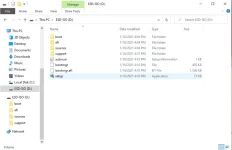
Hindi po sya cracked. Sa mismong microsoft ko sya dinownload boss
zackmark29
Elite
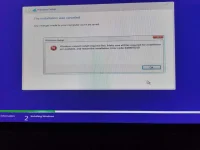
corrupted pagka create mo ng bootable. Ano bang ginamit mo? Rufus gamitin mo
2zroronoa2
Enthusiast
[XX='zackmark29, c: 675097, m: 77455'][/XX] rufus boss. Baka dahil dun sa ginawa ko. Pinindot ko na yung start ng rufus pero di ko pa pala natapos yung set up ng windows installer.
kung corrupted, dito ka magdownload ng ISO and use Rufus to flash pero palitan mo muna user agent ng browser mo or gawin mo nalang ito.
Chrome-based browser - 1. Press "Ctrl + Shift + I" or Press F12 to open DevTools
2. Press "Ctrl + Shift + M" to Toggle device toolbar/emulation.
3. If Responsive is selected then choose your desired device on the dropdown (e.g. iPad Pro, iPhone X, Pixel 2, etc...).
4. Then enter this link to the address bar
Chrome-based browser - 1. Press "Ctrl + Shift + I" or Press F12 to open DevTools
2. Press "Ctrl + Shift + M" to Toggle device toolbar/emulation.
3. If Responsive is selected then choose your desired device on the dropdown (e.g. iPad Pro, iPhone X, Pixel 2, etc...).
4. Then enter this link to the address bar
https://www.microsoft.com/en-us/software-download/windows10ISO then select edition, language and choose your desired architecture to download (64bit or 32bit).2zroronoa2
Enthusiast
Pano yan boss sa cellphone lang say gagawin? Di na ba kailangan ng usb flash drive?
2zroronoa2
Enthusiast
[XX='moondhie, c: 675151, m: 1068628'][/XX] haha oo nga eh nakalimutan ko lang boss. Nakita ko lang nung nag alt+tab ako habang naghihintay. 
2zroronoa2
Enthusiast
[XX='zackmark29, c: 675143, m: 77455'][/XX] uulitin ko na lang boss. Sana maayos na para magamit ko na PC ko 
2zroronoa2
Enthusiast
[XX='moondhie, c: 675185, m: 1068628'][/XX] kahit gusto ko gamitin di ko talaga magamit boss kasi wala pa rin OS 
2zroronoa2
Enthusiast
Kailangan ba boss may nakaconnect na cellphone sa PC kung saan ako gagawa nyan?
- Status
- Not open for further replies.
Similar threads
-
May virus ba yung nsfwph.com, kapag binubuksan ko kasi ay nalilipat sa mga ads
- Started by stormarrow817
- Replies: 2
-
-
-
-
About this Thread
-
33Replies
-
1KViews
-
12Participants
Last reply from:
2zroronoa2
2zroronoa2
New Topics
-
WINDOWS PRODUCT KEY
- Started by jhengky22
- Replies: 0
- ❓ Computer Discussion & Support
-
Request : 2027 calendars with Holidays
- Started by the_jinx
- Replies: 0
- ❓ Computer Discussion & Support
-
Dapat ba akong maalarma dito? Nagback-up na paunti-unti ako.
- Started by Jeii
- Replies: 0
- ❓ Computer Discussion & Support
-
Realtek audio missing in device manager
- Started by PHC-MERCURIAL
- Replies: 4
- ❓ Computer Discussion & Support
-
Suggest OS para sa budget pc yung lightweight.
- Started by YourR3ze
- Replies: 2
- ❓ Computer Discussion & Support
-
Microsoft copilot personal
- Started by WEIRJD
- Replies: 0
- ❓ Computer Discussion & Support
-
Lock profile or browser?
- Started by heyhey
- Replies: 7
- ❓ Computer Discussion & Support
-
Light/Gaming OS for 4 year old laptop
- Started by Genesis Storm
- Replies: 10
- ❓ Computer Discussion & Support
-
HWID SPOOFER HELP!
- Started by Balisain
- Replies: 0
- ❓ Computer Discussion & Support
-
LIGHTROOM APP PC
- Started by WHOOISDIYAAM
- Replies: 1
- ❓ Computer Discussion & Support
Trending Topics
Online now
- Members online
- 1,271
- Guests online
- 2,250
- Total visitors
- 3,521