 PH
PHJaredgreyson
Enthusiast
You do not have permission to view the full content of this post. Log in or register now.
Learn what's new in the 2019 releases of Premiere Pro CC.

The October 2018 release of Premiere Pro (version 13.0) rolls out exciting new features for video editors, filmmakers, broadcasters, and online content creators. Read on for a quick introduction to these features and links to resources offering more information.
Selective color grading
Take the guess work out of curve adjustments with innovative new Lumetri Color tools for selective color correction.
Each curve offers two axes with paired values, such as Hue versus Hue, or Luma versus Saturation, so you can fine-tune colors with ease and accuracy.
For more information, see You do not have permission to view the full content of this post. Log in or register now..
Display color management
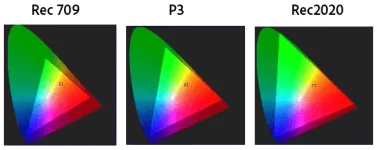
Accurate colors on all monitor profiles
To display accurate colors on any system, enable Display Color Management. It automatically converts colors to the color space of your display (including Rec. 709, Rec. 2020, and P3).
In the past, it was necessary to manually set your OS display profile to be sure that you were seeing accurate colors, and sometimes it was not possible. Display color management takes the guesswork and displays correct colors no matter what ICC profile your display is set to in the operating system.
For more information on enabling or disabling color management, see You do not have permission to view the full content of this post. Log in or register now..
Note:
This feature requires GPU acceleration.
Create and edit multiple Lumetri color effects
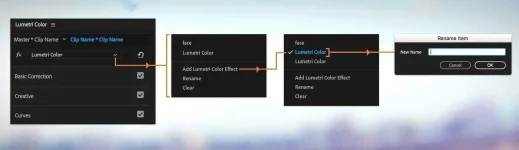
Create and edit multiple Lumetri color effects
In the Lumetri Color panel, you can now have multiple effects or layers stacked. After you create a new Lumetri color effect, you can rename it, add more layers, or subtract layers.
For more information, see You do not have permission to view the full content of this post. Log in or register now..
Edit Premiere Rush files in Premiere Pro
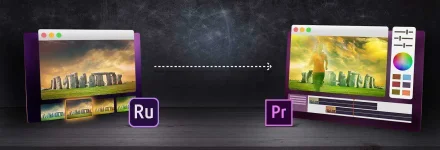
Edit Premiere Rush files in Premiere Pro
Premiere Rush CC is an all-new mobile and desktop app that lets you create and publish professional-quality video, including color, audio, and motion graphics from almost anywhere. You can capture and edit footage using Premiere Rush on iOS, macOS, or Windows.
When you want to take editing to the next level, you can open native Premiere Rush projects in Premiere Pro and continue to edit them in Premiere Pro.
For more information, see You do not have permission to view the full content of this post. Log in or register now..
Note:
If you have a single app Premiere Pro subscription, Rush is available bundled with it.
Intelligent audio cleanup
Intelligent audio cleanup (1 min)
Instantly improve your audio by removing background noise or reverb. The new Reduce Noise and Reduce Reverb sliders in the Essential Sound panel let you dial down, or remove, background noise and reverb. These options are also available as effects (DeNoise and DeReverb) in the Effects panel. You can apply them to your audio track and then control the intensity of the effect using the Effect Controls panel.
For more information, see:
- You do not have permission to view the full content of this post. Log in or register now.
- You do not have permission to view the full content of this post. Log in or register now. and You do not have permission to view the full content of this post. Log in or register now. in the Audition documentation
Edit and transform vector graphics
Vector motion controls prevent pixelation and eliminate render bounds. To transform layers of the graphics, and adjust and set keyframes directly, use the vector motion controls in the Essential Graphics panel or the Effects Control panel.When you edit graphics using the vector motion controls, they are retained as vector graphics preventing pixelation.
For more information, see You do not have permission to view the full content of this post. Log in or register now..
Ability to fine-tune Motion Graphics templates in Premiere Pro
Turn numbers into stories using data-driven Motion Graphics templates
Infographics and Motion Graphics templates (1 min)
In Premiere Pro, you can now add your own spreadsheet to a data driven After Effects Motion Graphic template (MOGRT) and drive the animation or make changes to the data in the MOGRT.
In earlier releases, you had to make a lot of tedious changes manually. For example, if you wanted to change the numbers in a chart for all months, January-December, you had to change 12 values manually. Now, if you have the data in a spreadsheet, you can simply map the spreadsheet to the MOGRT and all values are updated automatically.
For more information, see You do not have permission to view the full content of this post. Log in or register now..
Edit source text and group properties in Motion Graphics templates
You can now edit source text properties in Motion Graphics templates (if they are enabled for editing by the author in After Effects).Some of the properties you can edit are:
- Font selection
- Font size adjustment
- Faux styles
For more information, see You do not have permission to view the full content of this post. Log in or register now..
Note:
This is applicable for Motion Graphics templates created using After Effects CC versions 16.0 or later.
Change the duration of a Motion Graphics template
You can now change the duration of a Motion Graphics template in Premiere Pro simply, without altering protected portions of the template, such as intros or outros, or branding elements.For more information, see You do not have permission to view the full content of this post. Log in or register now..
Improved search experience of Motion Graphics templates in Adobe Stock
You can now search and sort cinematic footage and professionally designed Motion Graphics templates more efficiently with the pagination improvements in the Essential Graphics panel.For more information, see You do not have permission to view the full content of this post. Log in or register now..
VR enhancements
End-to-end workflows for 180 VR
You can create 180VR video with optimized ingest, editorial, and effects, for otoscopic and stereoscopic content that puts your audience right in the middle of the action. You can also output finished videos in the Google VR180 format for YouTube, Facebook, or other platforms.For more information, see You do not have permission to view the full content of this post. Log in or register now..
Add spatial markers to immersive media
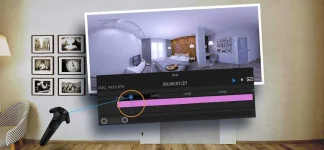
Spatial markers in Premiere Pro
You can now place spatial markers on your media while wearing your HMD (Head Mounted Display). In earlier versions of Premiere Pro, it required you to remove your headset to add markers.
For more information, see You do not have permission to view the full content of this post. Log in or register now..
New Theater mode in Adobe Immersive Environment
Theater Mode gives you a new portable reference monitor within the Adobe Immersive Environment. This mode acts as a virtual screening room for collaborating with your director or producer, whether for 2D or immersive content, or a combination of both.When you try to view footage with Adobe Immersive Environment (AIE) active, you now enter a virtual room with a monitor ahead of you that represents something like a home theater experience. Adobe Immersive Environment automatically switches to this "theater mode" when the Source or Program Monitor encounters traditional 2D, non-immersive footage.
For more information, see You do not have permission to view the full content of this post. Log in or register now..
Collaboration enhancements
Group invites for Team Projects
You can now invite collaborators to your team project using groups that are synced from your organization's directory (for enterprise users). You can also invite others to collaborate on your team project by inviting a group instead of typing individual email addresses.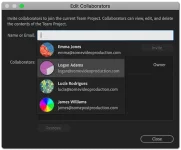
Invite collaborators to your team project
For more information, see You do not have permission to view the full content of this post. Log in or register now..
Creative Cloud Libraries enhancements
You can now:- Click drag-and-drop multiple asset types such as AI, PSD, and other file formats into the CC Libraries panel.
- Share your Libraries and Library assets among team members.
- Export your Libraries and store them with the rest of your assets upon completing a project, knowing that the Library can be restored if needed.
Performance enhancements and file format support
New file format support
Premiere Pro now supports the following new file formats:- Decode support for ARRI Alexa LF media.
- Decode support for Sony Venice X-OCN V2 media including anamorphic sources.
- High Efficiency Image Format (HEIF) capture format used by iPhone 8 and iPhone X (macOS 10.13.4 and later).
- Updated to the latest RED SDK (RED SDK 7.0.8), which includes performance and stability improvements.
Performance improvements
- Hardware-based decoding for H264 and native HEVC provides better performance for those formats and faster rendering.
- Improved image processing provides more responsive playback, rendering, and Lumetri Color performance.
New Home Screen
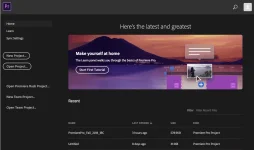
The Premiere Pro home screen when you first launch it
When you launch Premiere Pro, it now displays a Home Screen, which includes options to:
- Open a wide range of tutorials to help you quickly learn the basic workflows, and more advanced tips and tricks.
- Create a project or open an existing project.
Auto-save improvements
A new option Auto Save also saves the current project(s) has been added to the Auto Save preferences panel. When you enable this option, Auto Save creates an archived copy of one or more current projects, but also saves the current working project. This setting is off by default.Auto saved versions have a suffix with the date and time it was saved (yy-mm-dd-hh-mm-ss) appended to the project name (for example, ProjectName-2018-08-31_09-53-41.prproj).
When an auto save occurs, Premiere Pro creates a new backup project file and adds it to the auto-save folder as an emergency project backup. This file is always the latest saved version of that project.
For more information on auto-save preferences, see You do not have permission to view the full content of this post. Log in or register now..
Other changes
- Premiere Pro now shows a confirmation dialog if you delete preferences using the Alt or Opt keys at launch.
- You can now use shorthand substitutes when you enter timecode values (for example, a period instead of two zeros). You no longer have to type the zeros manually. For more information, see You do not have permission to view the full content of this post. Log in or register now..
- You can now delete clip markers on clips in the sequence without having to load them back into the Source monitor first to delete. For more information, see You do not have permission to view the full content of this post. Log in or register now..
- You can now press the Esc key to deselect anything that is selected in the Timeline.
- Label colors now remain visible when video clips are selected.