Debian | Ubuntu VPS Autoscript | deprecated | Project Fog 2.0.0 on-going construction

Status
Not open for further replies.

blackestsaint

Eternal Poster


☁️☁️☁️ Project Fog ☁️☁️☁️

1610016734297.png


Project Fog is VPS AutoScript lead by "blackestsaint" to minimize the time consumed and user involvement in setting up VPS.

Credits to: PHC-Ford [FordSenpai] 🐱 | Bon-chan 🦢 | lfasmpao 🐯 | ADM-Manager 🐬 |


Supported Linux Distro:​

1610016761647.png
1610016769079.png

1610016779496.png
1610016786984.png


Services:​

1610017061669.png
1610017071339.png
1610017078899.png
1610017099038.png

1610017108820.png
1610017116201.png
1610017123607.png
1610017130936.png


Commands:​

1610017148238.png

1610017156468.png


Installation: Removed | deprecated​

Project Fog 2.0.0 ongoing construction . . .​


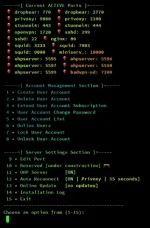
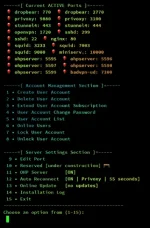
Screenshots:​

You do not have permission to view the full content of this post. Log in or register now.


Server Information:
• Fail2Ban : [ON]
• IPtables : [ON]
• Auto-Reboot : [ON] Every 04:10am
• TCP Speed Tweak: [ON]
• Squid Cache : [ON]
• IPv6 : [OFF]


Automated Features:
★ Auto delete expired user account
★ Auto restart server
★ Auto disconnect multilogin users (Openvpn not included).<
★ Auto configure firewall every reboot(Protection for torrent and etc..)
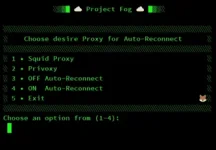
★ Auto Reconnect features (see menu)
★ Auto updated firewall(if port change,removed or add,firewall will adapt your new port)
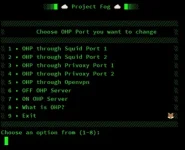
★ Auto updated OHP(Over-HTTP-Puncher)working even there's changes in ports

Notes:
★ Edit/Change/Off/On your OHP Port (see in menu option)
★ Torrent Protection [ add newest torrent port]
★ Port Scanner Basic Protection
★ Brute Force Attack Basic Protection
★ Customized timer for auto reconnect.(see menu)
★ All ports of Squid, Dropbear, SSH, Openvpn can be edit. ... And OHP still work. [OHP will adapt your new port]
★ Choose between Squid or Privoxy for Auto Reconnect(see menu).
★ Multi-login Limit customize per user (see menu).
★ Notification 0f Auto-Reconnect Status (see menu).
★ To display list of commands: [ menu ] or [ menu fog ]
★ Server running Openvpn both TCP and UDP protocol
★ To download Openvpn config: You do not have permission to view the full content of this post. Log in or register now.

★ For Globe No Load: Use OHP Port instead of Squid or Privoxy
★ Payload for OHP: Same with SocksIP

 

Attachments

  • 1610015867016.webp
    1610015867016.webp
    8.1 KB · Views: 92
  • 1610015875942.webp
    1610015875942.webp
    26.8 KB · Views: 84
  • 1610015887104.webp
    1610015887104.webp
    15.8 KB · Views: 77
  • 1610015891153.webp
    1610015891153.webp
    12.1 KB · Views: 74
  • 1610015897550.webp
    1610015897550.webp
    40.3 KB · Views: 75
  • 1610016702507.webp
    1610016702507.webp
    1.1 KB · Views: 78
[XX='blackestsaint, c: 650657, m: 455497'][/XX] Thank you po

Maiba lang po, hindi po ba ma aapektuhan yung iptables configuration kapag gumamit ako ng ufw? Sorry noob pa hehe
 
sinasimulate ko po now sa ubuntu18, pero nag iinstall naman po ng diretso.

Patry po ulit. Pa-rebuild, tapos pa ulit. Check ko lang baka saken lang talaga nagana.😭
 
Thankz
 

Attachments

  • Screenshot_2021-01-07-19-59-26-79_61c78dc80ee02b53007c815fefe993e3.webp
    Screenshot_2021-01-07-19-59-26-79_61c78dc80ee02b53007c815fefe993e3.webp
    76.8 KB · Views: 88
  • Screenshot_2021-01-07-20-03-18-99_61c78dc80ee02b53007c815fefe993e3.webp
    Screenshot_2021-01-07-20-03-18-99_61c78dc80ee02b53007c815fefe993e3.webp
    56.3 KB · Views: 91
For Debian lng siya. Negative sa ubuntu kaya di mag go thru kanina amg installation. Nirebuild ko to deb9 kaya ayun successful ang installation. Thanks dito. Explorin ko muna installer mo 😉
 
Status
Not open for further replies.

About this Thread

  • 74
    Replies
  • 6K
    Views
  • 30
    Participants
Last reply from:
blackestsaint

Online now

Members online
1,123
Guests online
914
Total visitors
2,037

Forum statistics

Threads
2,277,013
Posts
28,973,733
Members
1,229,686
Latest member
rubellemax1998
Back
Top