 PH
PHapolion322
Grasshopper
Wondershare Filmora 9.5.2.10 for video editing and HandBrake App for compressing videos.

 Good day po..Just want to share yun gamit ko po na video editor and pangcompressed ng video na ginagamit lalo ngayon new normal. Credits pala kay Sir Lace12
  na original uploader ng video editor. Siya nga pala yun instruction is nasa may folder nadin.Salamat..
Wondershare Filmora is an amazing and realistic video editing software that provides many tools and resources to edit your video the way you want it. Wondershare Filmora is very easy and simple editing software. which gives your videos a sharp finish, and with a little effort, you can operate it like a pro.
In addition, the latest version of filmora comes with many efficient editing tools, such as attractive filters, transitions, video effects, and borders to give your video a film look. You can easily install and activate your thoughts to place your video.
Link 1: You do not have permission to view the full content of this post. Log in or register now.
Link 2:
HAND BRAKE

Download Link:
Link 1: You do not have permission to view the full content of this post. Log in or register now.
Link 2:
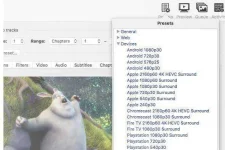
Built-in Device Presets
Get started with HandBrake in seconds by choosing a profile optimised for your device, or choose a universal profile for standard or high quality conversions. Simple, easy, fast. For those that want more choice, tweak many basic and advanced options to improve your encodes.
Supported Input Sources:
Handbrake can process most common multimedia files and any DVD or BluRay sources that do not contain any kind of copy protection.
Outputs:
Even more features
License
Most of HandBrake's source code is covered by the GNU General Public License, version 2. A copy of which is included with every release in the COPYING file. Portions are covered under BSD 3 Clause.
Credits
HandBrake uses a lot of (L)GPL or BSD licensed libraries: A list of these is available You do not have permission to view the full content of this post. Log in or register now.. Thank their authors!
Good day po..Just want to share yun gamit ko po na video editor and pangcompressed ng video na ginagamit lalo ngayon new normal. Credits pala kay Sir Lace12 na original uploader ng video editor. Siya nga pala yun instruction is nasa may folder nadin.Salamat..Wondershare Filmora is an amazing and realistic video editing software that provides many tools and resources to edit your video the way you want it. Wondershare Filmora is very easy and simple editing software. which gives your videos a sharp finish, and with a little effort, you can operate it like a pro.
In addition, the latest version of filmora comes with many efficient editing tools, such as attractive filters, transitions, video effects, and borders to give your video a film look. You can easily install and activate your thoughts to place your video.
System Requirements:
- 1GHz or higher processor speed
- Minimum of 256 MB RAM
- 2 GB free space in hard disk
- Windows 7, 8, and 10 with 64-Bit
What’s new in Wondershare Filmora 9.5.2.10?
- Some modified skills that allow you to organize up to 100 videos with amazing effects.
- More interesting and impressive effects, filters, and transitions that change the level of work.
- The improved speed also facilitates the import and export of the media.
- Many improvements in Chroma Key, which offer better results.
- Get rid of unstable images.
- Experience the smooth interface.
- Improvements in working with Mac or PC.
- Improved waveforms.
Link 1: You do not have permission to view the full content of this post. Log in or register now.
Link 2:
HAND BRAKE
Download Link:
Link 1: You do not have permission to view the full content of this post. Log in or register now.
Link 2:
Built-in Device Presets
Get started with HandBrake in seconds by choosing a profile optimised for your device, or choose a universal profile for standard or high quality conversions. Simple, easy, fast. For those that want more choice, tweak many basic and advanced options to improve your encodes.
Supported Input Sources:
Handbrake can process most common multimedia files and any DVD or BluRay sources that do not contain any kind of copy protection.
Outputs:
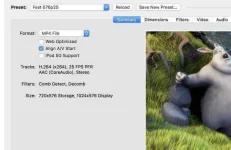
- File Containers: .MP4(.M4V) and .MKV
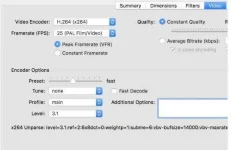
- Video Encoders: H.265 (x265 and QuickSync), H.264(x264 and QuickSync), H.265 MPEG-4 and MPEG-2, VP8, VP9 and Theora
- Audio Encoders: AAC / HE-AAC, MP3, Flac, AC3, or Vorbis
- Audio Pass-thru: AC-3, E-AC3, DTS, DTS-HD, TrueHD, AAC and MP3 tracks
Even more features
- Title / chapter and range selection
- Batch Scan and Queueing of encodes
- Chapter Markers
- Subtitles (VobSub, Closed Captions CEA-608, SSA, SRT)
- Constant Quality or Average Bitrate Video Encoding
- Support for VFR and CFR
- Video Filters: Deinterlacing, Decomb, Denoise, Detelecine, Deblock, Grayscale, Cropping and scaling
- Live Static and Video Preview
License
Most of HandBrake's source code is covered by the GNU General Public License, version 2. A copy of which is included with every release in the COPYING file. Portions are covered under BSD 3 Clause.
Credits
HandBrake uses a lot of (L)GPL or BSD licensed libraries: A list of these is available You do not have permission to view the full content of this post. Log in or register now.. Thank their authors!


 Baka po may update po kayo nito. Thanks