PH
PHPeash00ter
Elite
Sharing is caringg!!
Unang una sa lahat credits po sa nakadiscover neto. Napakadaling paraan para madownload ang albums or song sa spotify with Flac Format. Para po sa mga di pa nakakaalam. Alam ko marami na din naka discover neto
You just need:
√ Spotify - (then log in)
√ Telegram - (account then log in)
Working with:
1) Android
2) PC
Di ko sure sa IOS pero try mo pa din
PLS Feedback if working sa inyo!
Here's The Key!
1) Open your Spotify apps, copy link lang ng Songs/Albums na gusto mo idownload
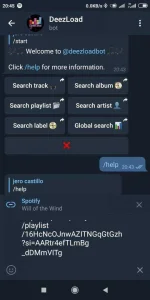
2) Open Telegram and search for @Deezloadbot (lalabas agad yon sa search bar)
* If di mo mahanap this is the link:
https://t me/DeezLoadBot
(replace with dot)
3) send message ka sa bot ng
" /settings " and magrereply sila ng quality ng songs then click mo yung: Flac or pwede kang pumili ng format na may mas mababang quality depende sa gusto mo.
4) After mo mapili yung Flac, mag message ka ng " /start " at send mo, after masend i-paste mo na yung Spotify link na gusto mo idownload, either album or songs at isend mo ulit. Wait ka lang ng few seconds at lalabas na dun yung music, then download/ save mo sa music mo. Naka Flac format na yon
Ganunn lang kadalii!!
Enjoy!!
Unang una sa lahat credits po sa nakadiscover neto. Napakadaling paraan para madownload ang albums or song sa spotify with Flac Format. Para po sa mga di pa nakakaalam. Alam ko marami na din naka discover neto
You just need:
√ Spotify - (then log in)
√ Telegram - (account then log in)
Working with:
1) Android
2) PC
Di ko sure sa IOS pero try mo pa din
PLS Feedback if working sa inyo!
Here's The Key!
1) Open your Spotify apps, copy link lang ng Songs/Albums na gusto mo idownload
2) Open Telegram and search for @Deezloadbot (lalabas agad yon sa search bar)
* If di mo mahanap this is the link:
https://t
me/DeezLoadBot(replace
with dot)3) send message ka sa bot ng
" /settings " and magrereply sila ng quality ng songs then click mo yung: Flac or pwede kang pumili ng format na may mas mababang quality depende sa gusto mo.
4) After mo mapili yung Flac, mag message ka ng " /start " at send mo, after masend i-paste mo na yung Spotify link na gusto mo idownload, either album or songs at isend mo ulit. Wait ka lang ng few seconds at lalabas na dun yung music, then download/ save mo sa music mo. Naka Flac format na yon
Ganunn lang kadalii!!
Enjoy!!