 PH
PHRagnverdhr
Elite
HTTP Tunneling Client
Cross platform http tunneling client
How to Use:
OpenVPN with HTTP Tunneling
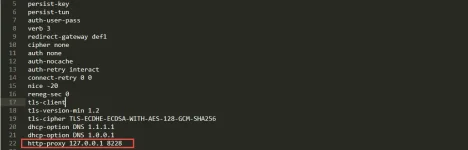
Add this on your OpenVPN Config File -> http-proxy 127.0.0.1 8228
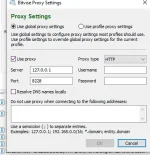
Bitvise SSH Client On Proxy Settings set the proxy server as 127.0.0.1 and port as 8228 then select proxy type as HTTP
Direct
./http-tunnel-client-win.exe -lp 8228 -payload "CONNECT [host_port] [protocol][crlf][crlf]" -rp "127.0.0.0:8080" -tunType "HTTP"
HTTP Payload
./http-tunnel-client-win.exe -lp 8228 -payload "CONNECT [host_port] [protocol][crlf][instant_split]GET You do not have permission to view the full content of this post. Log in or register now. HTTP/1.1[crlf]Host: google.com[crlf]X-Online-Host: google.com[crlf]X-Forward-Host: google.com[crlf]Connection: Keep-Alive[crlf][crlf]" -rp "127.0.0.0:8080" -tunType "HTTP"
SSL Tunnleing
./http-tunnel-client-win -lp 8228 -sni "google.com" -tunType "SSL"
Note:
Change the -rp value to your desired remote proxy server
Change the -lp value to your desired local proxy port
Run first the http tunneling client bago e run ang openvpn or bitvise ssh client
You can use HTTP Injector to generate payload, the http tunnel client also support splitting.
Download Link: You do not have permission to view the full content of this post. Log in or register now.
OpenVPN
Bitvise SSH Client
Cross platform http tunneling client
How to Use:
OpenVPN with HTTP Tunneling
Add this on your OpenVPN Config File -> http-proxy 127.0.0.1 8228
Bitvise SSH Client On Proxy Settings set the proxy server as 127.0.0.1 and port as 8228 then select proxy type as HTTP
Direct
./http-tunnel-client-win.exe -lp 8228 -payload "CONNECT [host_port] [protocol][crlf][crlf]" -rp "127.0.0.0:8080" -tunType "HTTP"
HTTP Payload
./http-tunnel-client-win.exe -lp 8228 -payload "CONNECT [host_port] [protocol][crlf][instant_split]GET You do not have permission to view the full content of this post. Log in or register now. HTTP/1.1[crlf]Host: google.com[crlf]X-Online-Host: google.com[crlf]X-Forward-Host: google.com[crlf]Connection: Keep-Alive[crlf][crlf]" -rp "127.0.0.0:8080" -tunType "HTTP"
SSL Tunnleing
./http-tunnel-client-win -lp 8228 -sni "google.com" -tunType "SSL"
Note:
Change the -rp value to your desired remote proxy server
Change the -lp value to your desired local proxy port
Run first the http tunneling client bago e run ang openvpn or bitvise ssh client
You can use HTTP Injector to generate payload, the http tunnel client also support splitting.
Download Link: You do not have permission to view the full content of this post. Log in or register now.
OpenVPN
Bitvise SSH Client