 PH
PHGrafixandart
Fanatic
Good day, I just want to share simple step on how to run xpp app, without using .xp config file. Okay lets start.
Need:
Xp Psiphon (use phc search box)
Android Phone (can run the app)
Talkntext sim (no load or promo require)
Apn (internet)
1. Go to the xpp app.
2. Locate the xp generator, see my screen shot for proper setting.
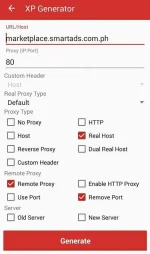
3. Hit generate.
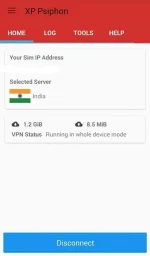
4. Afterwards, click connect. Default panel for server (Best Performance).
5. For no capped data, from the default server, choose India server.
If you had a hard time connecting to India server, try this:
-disconnect the app.
-airplane mode on (more or less 15sec.)
-airplane mode off ( for the phone to gain good connection, and change sim ip as well)
-kill the xpp app task.
-on setting, app section, click force stop, clear data.
-repeat the steps.
See my screenshot for data I consumed.
And my xpp app data consumed alone.
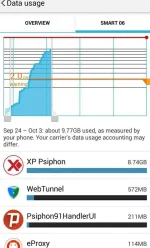
*keep in mind that you shouldn't exceed 2gb of data within a day, or else your sim data will be dead as meat.
Enjoy! Long live PhC!
+Capt.G.A+
Need:
Xp Psiphon (use phc search box)
Android Phone (can run the app)
Talkntext sim (no load or promo require)
Apn (internet)
1. Go to the xpp app.
2. Locate the xp generator, see my screen shot for proper setting.
3. Hit generate.
4. Afterwards, click connect. Default panel for server (Best Performance).
5. For no capped data, from the default server, choose India server.
If you had a hard time connecting to India server, try this:
-disconnect the app.
-airplane mode on (more or less 15sec.)
-airplane mode off ( for the phone to gain good connection, and change sim ip as well)
-kill the xpp app task.
-on setting, app section, click force stop, clear data.
-repeat the steps.
See my screenshot for data I consumed.
And my xpp app data consumed alone.
*keep in mind that you shouldn't exceed 2gb of data within a day, or else your sim data will be dead as meat.
Enjoy! Long live PhC!
+Capt.G.A+

 ..
..