 PH
PHgilbert_jpeg
Fanatic
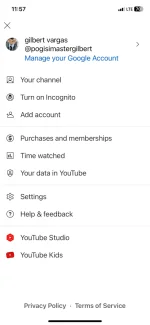
Eto na yung yt no ads sa ios via dns
Eto po ang proseso sa ios para makapag create tyo ng dns profile sa ios natin ng manual.
1st step
Go to You do not have permission to view the full content of this post. Log in or register now.
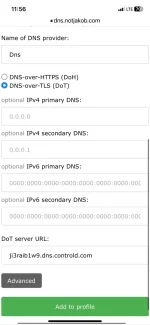
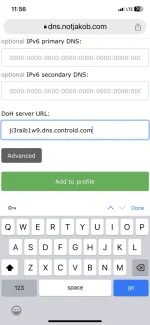
Then click the tools tapos click mo yung dns over tls na button then input etong dns na url
ji3raib1w9.dns.controld.com (dns credit kay paps rhuds)
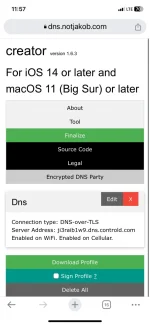
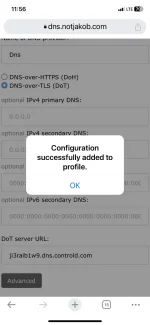
Tapos click add to profile then download nyo na yung ni create nyo na dns profile the select install, install tapos ok na check nyo yt nyo kung wala ng ads or wala na yung get premium na option sa settings ng yt app nyo happy streaming!
Eto po ang proseso sa ios para makapag create tyo ng dns profile sa ios natin ng manual.
1st step
Go to You do not have permission to view the full content of this post. Log in or register now.
Then click the tools tapos click mo yung dns over tls na button then input etong dns na url
ji3raib1w9.dns.controld.com (dns credit kay paps rhuds)
Tapos click add to profile then download nyo na yung ni create nyo na dns profile the select install, install tapos ok na check nyo yt nyo kung wala ng ads or wala na yung get premium na option sa settings ng yt app nyo happy streaming!

