 PH
PHEviacam
(Enable Via cam)

Enable Viacam (eViacam) is a mouse replacement
software that moves the pointer as you move your head.
It works on standard PC equipped with a webcam. No additional hardware is required.
How to use:
1. Install The Setup
2. Look at my screenshots below to understand it:
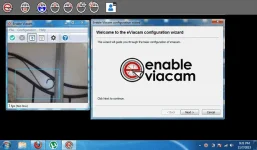
Sorry, ayaw ko pakita mukha ko. sa facebook nlngs! haha. xD
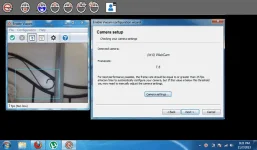
Yes, the camera of my laptop has been detected by eviacam mga kaphcorner.
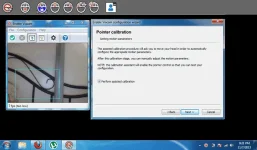
sa step na to you will move your head up & down, left & right. :beat:
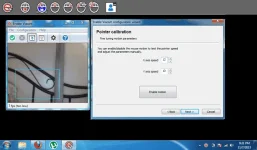
dyan, pwede mo iadjust ung settings so pag minove mo head mo kontrolado mo motion ng mouse pointer.
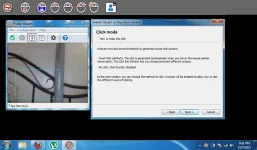
Eto ung fun part. The "click mode" sa una sinunod ko instructions na kelangan mo umacting na maduduwal ka para magclick ung mouse.pero naisip kong pag may nkakita ng iba sakin na ginagawa ko yun e maisip nilang baliw ako o sinasapian.haha...o kaya, "tamo tong taong to,mukang ****" napansin kong ang motion ay hindi sa head kundi sa face kaya if you wink, smile, pout, or do stupid E×ρréššions sa mukha mo e magcliclick ung mouse.sensya guys,taglishera si friend. :yipee:
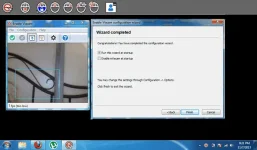
Thats it. choice mo kung irurun mo sa startup o hindi. ngayon alam mo na ang gagawin, ano pa hinihintay mo, dl and try na! :excited: I recommend this for people na,
1. gusto magpakasaya sa app na to,
2. gusto magkahigh tech app sa pc niya.
3. people with disabilities, for example (broken arm, no hands, no arm) haha.gets??
DIRECT DOWNLOAD LINK: You do not have permission to view the full content of this post. Log in or register now.
PASSWORD: googledotcom
Please Care to Comment! Pinagkahirapan ko to, dugo't pawis inalay ko maipublish at maishare lang ang thread na to sainyo!
Enjoy guys!
(Enable Via cam)
Enable Viacam (eViacam) is a mouse replacement
software that moves the pointer as you move your head.
It works on standard PC equipped with a webcam. No additional hardware is required.
How to use:
1. Install The Setup
2. Look at my screenshots below to understand it:
Sorry, ayaw ko pakita mukha ko. sa facebook nlngs! haha. xD
Yes, the camera of my laptop has been detected by eviacam mga kaphcorner.
sa step na to you will move your head up & down, left & right. :beat:
dyan, pwede mo iadjust ung settings so pag minove mo head mo kontrolado mo motion ng mouse pointer.
Eto ung fun part. The "click mode" sa una sinunod ko instructions na kelangan mo umacting na maduduwal ka para magclick ung mouse.pero naisip kong pag may nkakita ng iba sakin na ginagawa ko yun e maisip nilang baliw ako o sinasapian.haha...o kaya, "tamo tong taong to,mukang ****"
napansin kong ang motion ay hindi sa head kundi sa face kaya if you wink, smile, pout, or do stupid E×ρréššions sa mukha mo e magcliclick ung mouse.sensya guys,taglishera si friend. :yipee:Thats it. choice mo kung irurun mo sa startup o hindi. ngayon alam mo na ang gagawin, ano pa hinihintay mo, dl and try na! :excited: I recommend this for people na,
1. gusto magpakasaya sa app na to,
2. gusto magkahigh tech app sa pc niya.
3. people with disabilities, for example (broken arm, no hands, no arm) haha.gets??
DIRECT DOWNLOAD LINK: You do not have permission to view the full content of this post. Log in or register now.
PASSWORD: googledotcom
Please Care to Comment!
Pinagkahirapan ko to, dugo't pawis inalay ko maipublish at maishare lang ang thread na to sainyo! Enjoy guys!

 layful: