PH
PHHello po mga ka-PHC Salamat po pala sa mga nag share po ng tutorial po nila at tips para makapag set up ng v2Ray lalo na po kina
The_killer 01
Marcbuday
ruweetupue
Salamat po sa pag gabay mga boss solid po kayo haha
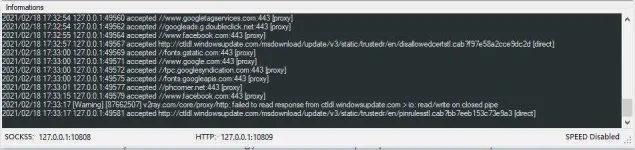
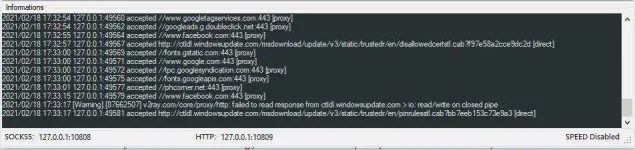
Kagat naman sya agad mga boss tamang Restart Service lang pag dina kumakagat
Good po ito sa browsing sa mga nag reresearch pero diko mapangako sa stable connection during zoom or other way na pang online class
Surfing lang po sya pero kung gagamitan natin ng Proxifier pwede natin magamit for Gaming and Downloading
Paki download muna ito mga boss :
Link ng
You do not have permission to view the full content of this post. Log in or register now.
Thread para sa Proxifier
https://phcorner.org/threads/proxifier-pro-with-license-keys.1017791/
I. Changing Language
Open V2ray app then locate HELP
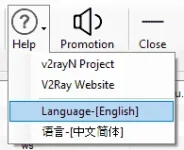
Change to ENGLISH then close the app even at App tray
Then, Open again the app to see the changes
II. Importing Config
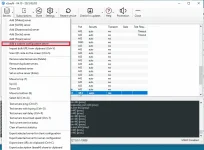
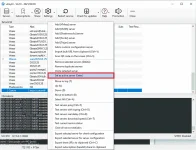
1. Open v2ray app select SERVERS and choose Add a custom configuration server
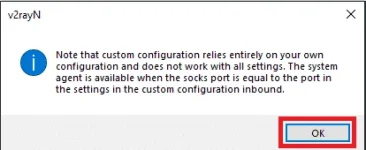
2. Click OK when note pops-up
3. Locate the file (config) and press Open
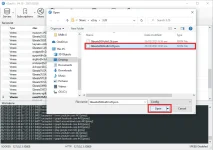
4. Set the imported config as active server or simply click the imported config and press Enter
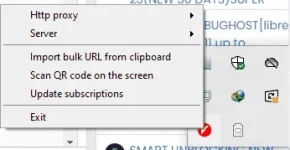
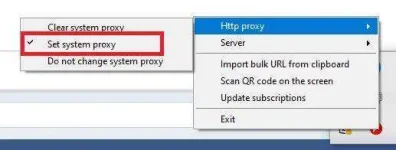
5. In your app tray, Set the Http proxy to : Set system proxy or HTTP Global
III. Access other Apps using Proxifier
1. Open Proxifier
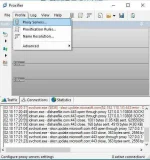
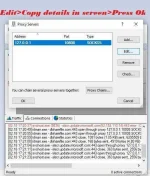
2. Go to Edit Lagay nyo lang po yung address,port and type then Press Ok
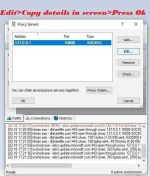
EDIT: Para patuloy na mapagana ang Proxifier at mapagana ang IDM/Online games at iba pa kailangan na natin
gumamit ng proxy rules
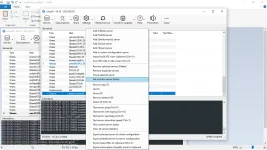
2.1 Click lang ito:
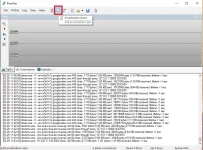
2.2 Eto ang ating makikita, tapos Click ADD para sa gusto nating mapagana na APP using proxifier
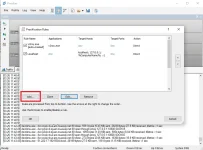
2.3 Lagyan ng name , then click Browse the locate the app
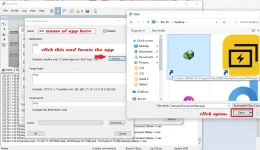
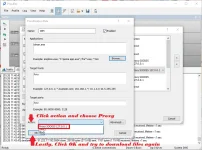
2.4 Click Action tapos piliin lang natin yung gamit nating proxy then press ok tapos ok ulit haha
Yan Good to go na yan mga boss pwede na mag download using IDM
para naman mapagana yung Game na gusto mo same process lang, lahat ng app na gusto mong mapagana using proxifer + v2ray ulitin nyo lang yung process ng step 2 - 2.4
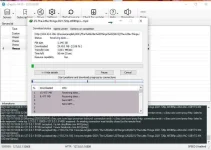
Pero as of now (March26) di na ako gumagamit ng idm sa mismong browser (edge) nalang ako nag ddownload

Credits po ito sa lahat ng nag share ng App,SNI,Tutorials, ambabait nyo mga idol kaya share ko rin tong munting gawa ko haha
Pa Feed back nalang mga boss kung Goods din sa inyo.
Salamat!
- Sharing is Caring -
The_killer 01
Marcbuday
ruweetupue
Salamat po sa pag gabay mga boss solid po kayo haha
Kagat naman sya agad mga boss tamang Restart Service lang pag dina kumakagat
Good po ito sa browsing sa mga nag reresearch pero diko mapangako sa stable connection during zoom or other way na pang online class
Surfing lang po sya pero kung gagamitan natin ng Proxifier pwede natin magamit for Gaming and Downloading
Paki download muna ito mga boss :
Link ng
You do not have permission to view the full content of this post. Log in or register now.
Thread para sa Proxifier
https://phcorner.org/threads/proxifier-pro-with-license-keys.1017791/
I. Changing Language
Open V2ray app then locate HELP
Change to ENGLISH then close the app even at App tray
Then, Open again the app to see the changes
II. Importing Config
1. Open v2ray app select SERVERS and choose Add a custom configuration server
2. Click OK when note pops-up
3. Locate the file (config) and press Open
4. Set the imported config as active server or simply click the imported config and press Enter
5. In your app tray, Set the Http proxy to : Set system proxy or HTTP Global
III. Access other Apps using Proxifier
1. Open Proxifier
2. Go to Edit Lagay nyo lang po yung address,port and type then Press Ok
EDIT: Para patuloy na mapagana ang Proxifier at mapagana ang IDM/Online games at iba pa kailangan na natin
gumamit ng proxy rules
2.1 Click lang ito:
2.2 Eto ang ating makikita, tapos Click ADD para sa gusto nating mapagana na APP using proxifier
2.3 Lagyan ng name , then click Browse the locate the app
2.4 Click Action tapos piliin lang natin yung gamit nating proxy then press ok tapos ok ulit haha
Yan Good to go na yan mga boss pwede na mag download using IDM
para naman mapagana yung Game na gusto mo same process lang, lahat ng app na gusto mong mapagana using proxifer + v2ray ulitin nyo lang yung process ng step 2 - 2.4
Pero as of now (March26) di na ako gumagamit ng idm sa mismong browser (edge) nalang ako nag ddownload
Credits po ito sa lahat ng nag share ng App,SNI,Tutorials, ambabait nyo mga idol kaya share ko rin tong munting gawa ko haha
Pa Feed back nalang mga boss kung Goods din sa inyo.
Salamat!
- Sharing is Caring -