 PH
PHHow to update / replace Office license key before the expiration date? Is there a way to change the product key without reinstalling Office suite? Do you have an old PC you want to sell, but also want to transfer your Office license to your new PC? In this tutorial we’ll show you an easy way to remove the existing product key registered with your Microsoft Office 2019 / 2016 / 2013 application.
Here's what you have to do:
STEP 1: Check the Office License Status
To get started, open the Command Prompt as administrator. Navigate to the Microsoft Office program folder using the cd command. The subfolder varies depending on your Office version:
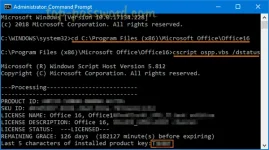
You’ll see some license details such as the license type (a retail copy, a volume licensed copy, or Office subscriptions copy) and the last 5 characters of the product key.
STEP 2: Remove Existing Office Product Key
To remove your Office product key, you need to use the /unpkeyswitch, along with the last 5 characters of the product key.
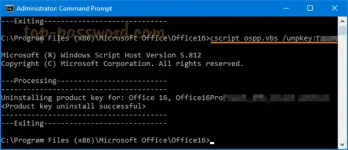
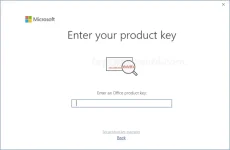
You will be told that your Office product key has been uninstalled. Now, Open any Office application like Word and it’ll ask you to enter new product key.
Well done! ~
Thanks to You do not have permission to view the full content of this post. Log in or register now. for this.
Here's what you have to do:
STEP 1: Check the Office License Status
To get started, open the Command Prompt as administrator. Navigate to the Microsoft Office program folder using the cd command. The subfolder varies depending on your Office version:
- Office 2016 / 2019: C:\Program Files\Microsoft Office\Office16 or C:\Program Files (x86)\Microsoft Office\Office16
- Office 2013: C:\Program Files\Microsoft Office\Office15 or C:\Program Files (x86)\Microsoft Office\Office15
Code:
cscript ospp.vbs /dstatusYou’ll see some license details such as the license type (a retail copy, a volume licensed copy, or Office subscriptions copy) and the last 5 characters of the product key.
STEP 2: Remove Existing Office Product Key
To remove your Office product key, you need to use the /unpkeyswitch, along with the last 5 characters of the product key.
Code:
cscript ospp.vbs /unpkey:{last five characters of product key}You will be told that your Office product key has been uninstalled. Now, Open any Office application like Word and it’ll ask you to enter new product key.
Well done! ~
Thanks to You do not have permission to view the full content of this post. Log in or register now. for this.
