 PH
PHWindows Installer Unused Files Cleanup Tool
The Windows Installer UnUsed Files Cleanup Tool (WICleanup) by KZTechs is able to scan for orphaned MSI and MSP files in the \Windows\Installer folder and offers you an option to delete them from the comfort of a graphical user interface. For scripts and command line usage, WICleanup also includes a command line version in the archive (WICleanupC.exe).
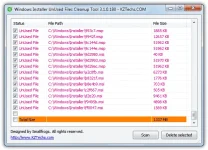
All you need to do is extract the downloaded ZIP file, run the WICleanupUI.exe and click the Scan button. All the entries that show in the window are orphaned files and manually check the boxes for what you want to delete. Although it has no option to automatically select all files for deletion, you can use the Shift key to multi-select, i.e; click the first file, hold Shift and click the last file, then click one of the selected tick boxes. It would have been useful if this tool offered an option to backup the unused files instead of deleting them in case of any potential problems. Note the the website is in Japanese.
Yan po, for short, wicleanup is safely deleting .msi at .msp files sa windows installer folder na di naman kelangan. ang mga .msi at .msp files ay yun yung Microsoft installer ρá†ch na ginagamit sa pag update ng OS w/ security patches, hotfixes, etc. may option sa ccleaner na delete .msi files pero di na madedelete lahat.eto lahat eh..yun lang po.enjoy mga friends! :lol:
DIRECT DOWNLOAD LINK: You do not have permission to view the full content of this post. Log in or register now.
PASSWORD: googledotcom
The Windows Installer UnUsed Files Cleanup Tool (WICleanup) by KZTechs is able to scan for orphaned MSI and MSP files in the \Windows\Installer folder and offers you an option to delete them from the comfort of a graphical user interface. For scripts and command line usage, WICleanup also includes a command line version in the archive (WICleanupC.exe).
All you need to do is extract the downloaded ZIP file, run the WICleanupUI.exe and click the Scan button. All the entries that show in the window are orphaned files and manually check the boxes for what you want to delete. Although it has no option to automatically select all files for deletion, you can use the Shift key to multi-select, i.e; click the first file, hold Shift and click the last file, then click one of the selected tick boxes. It would have been useful if this tool offered an option to backup the unused files instead of deleting them in case of any potential problems. Note the the website is in Japanese.
Yan po, for short, wicleanup is safely deleting .msi at .msp files sa windows installer folder na di naman kelangan.
ang mga .msi at .msp files ay yun yung Microsoft installer ρá†ch na ginagamit sa pag update ng OS w/ security patches, hotfixes, etc. may option sa ccleaner na delete .msi files pero di na madedelete lahat.eto lahat eh..yun lang po.enjoy mga friends! :lol:DIRECT DOWNLOAD LINK: You do not have permission to view the full content of this post. Log in or register now.
PASSWORD: googledotcom
