PH
PHeviljohn12
Enthusiast
Download
==============
Instructions:
=============
1. do not disable internet
2. install Creative_Cloud_Set-Up
3. do not allow AGS (adobe genuine service) if prompt
4. login with your account (GOOGLE or facebook)
5. Close program completely (even from system tray)
6. Right click on "AdobeGenP.exe" in ρá†ch/Release folder and click "Run as administrator"
7. Click on "Search" button and select then on "ρá†ch"
8. Wait till patching is done
9. open adobe creative cloud app in startmenu
10.follow the step below
1. click app
2. click beta app
3. click install
4. wait for it to install
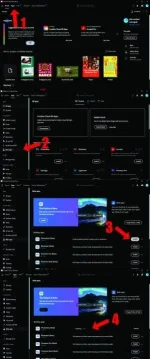
11. after done installation , DO NOT OPEN PHOTOSHOP BETA.
12. Repeat step 5-8.
13. That's it, Enjoy!

==============
Instructions:
=============
1. do not disable internet
2. install Creative_Cloud_Set-Up
3. do not allow AGS (adobe genuine service) if prompt
4. login with your account (GOOGLE or facebook)
5. Close program completely (even from system tray)
6. Right click on "AdobeGenP.exe" in ρá†ch/Release folder and click "Run as administrator"
7. Click on "Search" button and select then on "ρá†ch"
8. Wait till patching is done
9. open adobe creative cloud app in startmenu
10.follow the step below
1. click app
2. click beta app
3. click install
4. wait for it to install
11. after done installation , DO NOT OPEN PHOTOSHOP BETA.
12. Repeat step 5-8.
13. That's it, Enjoy!