🔒 Closed MALWARE! IDM - 6.X.X PATCHER VERSION 2.4

Status
Not open for further replies.

Jye Walker

Eternal Poster
NOTE:
No HATE, open topic ito baka nagkamali lang ako kaya kailangan ko din yung ibang tester. Pero inulit ko ang steps ganon talaga.

So nag try ako ng patcher ng IDM from this thread:
https://phcorner.org/threads/intern...40-11-with-6-x-x-patcher-version-2-4.1324106/

Undetected daw ang file na ginamit kaya ginamit ko pang ρá†ch sa IDM although mdami akong sources at ibang patcher. In-upload ko uli ang file sa virustotal at ito ang totong result:
IDM 6.xx Patcher.exe: You do not have permission to view the full content of this post. Log in or register now.

Napaisip ako, bakit undetected sa original post? kasi di nilabas ang file bago in-upload, at nasa zip file pa. So nong na try ko ang ρá†ch, kinabukasan nag pop-up na infected ang IDM.exe mismo:
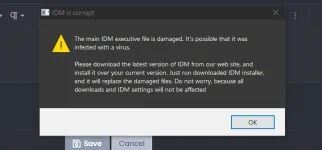
Screenshot (299).png


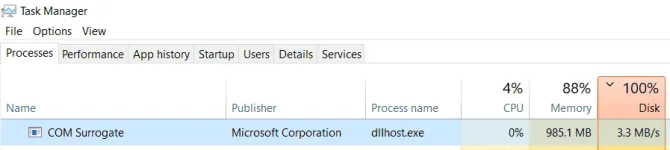
Di naman ako takot kasi ganyan talaga pag may patcher. Nag check ako ng Task Manager:
Screenshot (295).png


Ang nakita ko ito, at napaisip ako na parang bago 'to ah. Nag open ako sa file location niyan:

Screenshot (296)_LI.jpg


Virus total:
dllhost.exe: You do not have permission to view the full content of this post. Log in or register now.
WinRing0.sys: You do not have permission to view the full content of this post. Log in or register now.

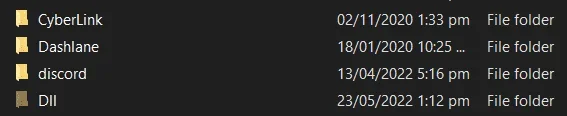
Base sa date of creation, bago palang siya at yung folder niyan:
Screenshot (297).png


Naka HIDE ang folder! kaya suspicious talaga. Naglalag kasi laptop ko. Di ako naglalagay ng mabigat na antivirus kasi ako mismo ang naghahap ng virus sa laptop. Bale windows defender plus smadav (2nd layer) lang.

Conclusion:
Ang cráck from cráckingcity.com (kasi yan source nila) ay isang malware na undetected. Malakas kasi kumain ng RAM.

PS:
Bitcominer daw yung nakatago na Dll folder:
Undetected Malware keeps on creating hidden folder.
 
meron naman talaga patcher na may palaman
pero suriin nyo rin maige, dahil yang results ng av scanner na ginagamit natin eh karamihan based on report ang majortiy and the rest is based on testing
severity of detections may vary from low to severe or extreme, in any case better be safe then sorry lalo na kung below power user and computer skills/literacy nyo.... if your gut instinct tells you na wag nyo gamitin then by all means huwag nyo gamitin
even if the detection is flagged as "low" you should not take your chances with it unless you know how to deal with malware infections manually at kahit nakapikit

moving forward about detections kung false positive or hindi.... how can we tell? there is no general rule to that
pero you can do some research
eto isang nakita ko sa isa pang forum site kung alam nyo yung teamos-hkrg

COPY/PASTE FROM SOURCE, CTTO

"
VirusTotal false positive - How to know?


I am going to share some tips to help you know if a VirusTotal detection may or may not be a false positive.

Obviously this is not 100% certain as there are many virus writers who leave their Trojans or other malware undetectable, but it can be a good start when in doubt.

Always before the slightest doubt, install the program detected as malware in a VM or Windows Sandbox and monitor its behavior.

Here are the tips:
1)
You got it from the offical site, it's not impossible but unlikely to be bad

2) The antivirus that detects it is not one of the well-known ones, and it's the only one

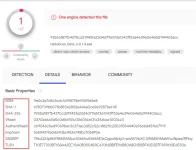
3) Combine low detection rate with the age of the file (First Submission Time in the Details tab in VirusTotal): If it's a few months old, it's most likely clean. Old malware doesn't stay on low detection rates for that long.

4) Check the hash values of our download, we can go to the website of the developer of the program for which we have the installer and look for the MD5, SHA-1, SHA-256 code, etc. of its original installer. Once we have the two codes available, that of our downloaded file and that of the installer or software from the developer's official website, we can compare both and see if they match and our file is reliable or not.

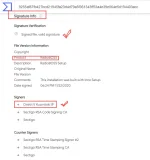
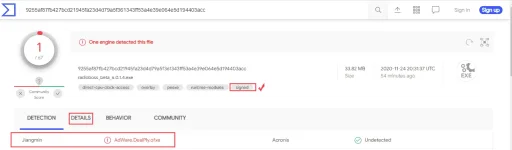
5) Check if the file is signed and if that sign is valid. You also see that in the VirusTotal Details tab. Things like adware and unwanted programs can also be signed. But if you trust the company or organization that signed it, the file is most likely clean.

false+1.png
false+2.png
false+3.png


MORE:

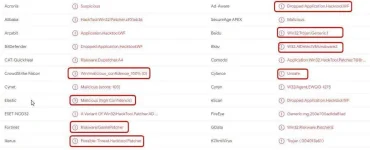
1. The name itself. Often we will see a mix of the words, Something-Generic-something, Gen-something, PUA (Possible Unwanted, Application), häçktool-xxx, Malicious-xxxx, Gen_Trojan, RiskTool, and in general not a specific virus name. The above can also be seen in variations like PUS (software) or PUF (file). The reason those names often pop is because of either the heuristic function, which essentially tries to guess if a part of code inside a program is a virus, based on some known code patterns or because after some time the medicine that is included along with programs get detected as a virus by the AV to scare/warn people.

2. We won't see the same virus name repeat on several antivirus engines concurrently and consistently. Some a/v will show one name, and, some others will show a different. If it was indeed a known virus, most AV will show the same name or the same sub variation.

As an example, look at the screen below and you will see exactly what I described above. Generic names (häçktool, Generic, malicious, etc) and each engine give its own name. You can understand how fake some programs and results are just by looking at the name. W32.AIDetectVM... AI as in Artificial Intelligence which is simply a catchphrase used from marketing to impress.

false+4.jpg


Needless to say, no matter what, attention to detail and caution must be exercised always. Remember to scan the "medicine" as well as the main app. Dont be afraid to ask if you are not sure but don't wear the tinfoil hats either.

"

yung "medicine" na tinutukoy nya dyan eh yung ρá†ch.... sabi pa nya "could be safer to use a dll based medicine kesa sa ρá†ch
I hope it helps even in the smallest details

sa case mo ts na ganyan napansin mo na may kakaiba nagyayari sa laptop mo then I suggest wag mo na gamitin yan
 
meron naman talaga patcher na may palaman
pero suriin nyo rin maige, dahil yang results ng av scanner na ginagamit natin eh karamihan based on report ang majortiy and the rest is based on testing
severity of detections may vary from low to severe or extreme, in any case better be safe then sorry lalo na kung below power user and computer skills/literacy nyo.... if your gut instinct tells you na wag nyo gamitin then by all means huwag nyo gamitin
even if the detection is flagged as "low" you should not take your chances with it unless you know how to deal with malware infections manually at kahit nakapikit

moving forward about detections kung false positive or hindi.... how can we tell? there is no general rule to that
pero you can do some research
eto isang nakita ko sa isa pang forum site kung alam nyo yung teamos-hkrg

COPY/PASTE FROM SOURCE, CTTO

"
VirusTotal false positive - How to know?


I am going to share some tips to help you know if a VirusTotal detection may or may not be a false positive.

Obviously this is not 100% certain as there are many virus writers who leave their Trojans or other malware undetectable, but it can be a good start when in doubt.

Always before the slightest doubt, install the program detected as malware in a VM or Windows Sandbox and monitor its behavior.

Here are the tips:
1)
You got it from the offical site, it's not impossible but unlikely to be bad

2) The antivirus that detects it is not one of the well-known ones, and it's the only one

3) Combine low detection rate with the age of the file (First Submission Time in the Details tab in VirusTotal): If it's a few months old, it's most likely clean. Old malware doesn't stay on low detection rates for that long.

4) Check the hash values of our download, we can go to the website of the developer of the program for which we have the installer and look for the MD5, SHA-1, SHA-256 code, etc. of its original installer. Once we have the two codes available, that of our downloaded file and that of the installer or software from the developer's official website, we can compare both and see if they match and our file is reliable or not.

5) Check if the file is signed and if that sign is valid. You also see that in the VirusTotal Details tab. Things like adware and unwanted programs can also be signed. But if you trust the company or organization that signed it, the file is most likely clean.

View attachment 1950562View attachment 1950563View attachment 1950564

MORE:

1. The name itself. Often we will see a mix of the words, Something-Generic-something, Gen-something, PUA (Possible Unwanted, Application), häçktool-xxx, Malicious-xxxx, Gen_Trojan, RiskTool, and in general not a specific virus name. The above can also be seen in variations like PUS (software) or PUF (file). The reason those names often pop is because of either the heuristic function, which essentially tries to guess if a part of code inside a program is a virus, based on some known code patterns or because after some time the medicine that is included along with programs get detected as a virus by the AV to scare/warn people.

2. We won't see the same virus name repeat on several antivirus engines concurrently and consistently. Some a/v will show one name, and, some others will show a different. If it was indeed a known virus, most AV will show the same name or the same sub variation.

As an example, look at the screen below and you will see exactly what I described above. Generic names (häçktool, Generic, malicious, etc) and each engine give its own name. You can understand how fake some programs and results are just by looking at the name. W32.AIDetectVM... AI as in Artificial Intelligence which is simply a catchphrase used from marketing to impress.

View attachment 1950566

Needless to say, no matter what, attention to detail and caution must be exercised always. Remember to scan the "medicine" as well as the main app. Dont be afraid to ask if you are not sure but don't wear the tinfoil hats either.

"

yung "medicine" na tinutukoy nya dyan eh yung ρá†ch.... sabi pa nya "could be safer to use a dll based medicine kesa sa ρá†ch
I hope it helps even in the smallest details

sa case mo ts na ganyan napansin mo na may kakaiba nagyayari sa laptop mo then I suggest wag mo na gamitin yan
Sir, ganyan din procedure ko
 
basta sa akin eh pag detected ng av kahit ano cr4ck or p4tch na gusto gamitin binabasura ko na lang, hassle din naman mag-clean install ng windows kung matyempuhan na ma-infect nga
Nakalimutan kong i-try sa virtual machine, nakakatamad kasi pero good for logging or makita yung changes at activity ng program.
 
basta sa akin eh pag detected ng av kahit ano cr4ck or p4tch na gusto gamitin binabasura ko na lang, hassle din naman mag-clean install ng windows kung matyempuhan na ma-infect nga
FDM lang sapat na no need cr4ck na kasi free naman...
 
meron naman talaga patcher na may palaman
pero suriin nyo rin maige, dahil yang results ng av scanner na ginagamit natin eh karamihan based on report ang majortiy and the rest is based on testing
severity of detections may vary from low to severe or extreme, in any case better be safe then sorry lalo na kung below power user and computer skills/literacy nyo.... if your gut instinct tells you na wag nyo gamitin then by all means huwag nyo gamitin
even if the detection is flagged as "low" you should not take your chances with it unless you know how to deal with malware infections manually at kahit nakapikit

moving forward about detections kung false positive or hindi.... how can we tell? there is no general rule to that
pero you can do some research
eto isang nakita ko sa isa pang forum site kung alam nyo yung teamos-hkrg

COPY/PASTE FROM SOURCE, CTTO

"
VirusTotal false positive - How to know?


I am going to share some tips to help you know if a VirusTotal detection may or may not be a false positive.

Obviously this is not 100% certain as there are many virus writers who leave their Trojans or other malware undetectable, but it can be a good start when in doubt.

Always before the slightest doubt, install the program detected as malware in a VM or Windows Sandbox and monitor its behavior.

Here are the tips:
1)
You got it from the offical site, it's not impossible but unlikely to be bad

2) The antivirus that detects it is not one of the well-known ones, and it's the only one

3) Combine low detection rate with the age of the file (First Submission Time in the Details tab in VirusTotal): If it's a few months old, it's most likely clean. Old malware doesn't stay on low detection rates for that long.

4) Check the hash values of our download, we can go to the website of the developer of the program for which we have the installer and look for the MD5, SHA-1, SHA-256 code, etc. of its original installer. Once we have the two codes available, that of our downloaded file and that of the installer or software from the developer's official website, we can compare both and see if they match and our file is reliable or not.

5) Check if the file is signed and if that sign is valid. You also see that in the VirusTotal Details tab. Things like adware and unwanted programs can also be signed. But if you trust the company or organization that signed it, the file is most likely clean.

View attachment 1950562View attachment 1950563View attachment 1950564

MORE:

1. The name itself. Often we will see a mix of the words, Something-Generic-something, Gen-something, PUA (Possible Unwanted, Application), häçktool-xxx, Malicious-xxxx, Gen_Trojan, RiskTool, and in general not a specific virus name. The above can also be seen in variations like PUS (software) or PUF (file). The reason those names often pop is because of either the heuristic function, which essentially tries to guess if a part of code inside a program is a virus, based on some known code patterns or because after some time the medicine that is included along with programs get detected as a virus by the AV to scare/warn people.

2. We won't see the same virus name repeat on several antivirus engines concurrently and consistently. Some a/v will show one name, and, some others will show a different. If it was indeed a known virus, most AV will show the same name or the same sub variation.

As an example, look at the screen below and you will see exactly what I described above. Generic names (häçktool, Generic, malicious, etc) and each engine give its own name. You can understand how fake some programs and results are just by looking at the name. W32.AIDetectVM... AI as in Artificial Intelligence which is simply a catchphrase used from marketing to impress.

View attachment 1950566

Needless to say, no matter what, attention to detail and caution must be exercised always. Remember to scan the "medicine" as well as the main app. Dont be afraid to ask if you are not sure but don't wear the tinfoil hats either.

"

yung "medicine" na tinutukoy nya dyan eh yung ρá†ch.... sabi pa nya "could be safer to use a dll based medicine kesa sa ρá†ch
I hope it helps even in the smallest details

sa case mo ts na ganyan napansin mo na may kakaiba nagyayari sa laptop mo then I suggest wag mo na gamitin yan
very well said. thanks for sharing this idol. :)
 
Yan din ung nadownload ko kaya pala twing inilalagay ko sa chrome nag ffreeze at hang ... Kaya inunintall ko chrome ko .. nag try ako ng brave ok naman nung di ko nilalagay sa extension ung idm... Pero nag try ulit ako kinabukasan nilagay ko ulit sa extention at un na nga tumpak sya nga dahilan

Ito dahilan kung bakit nag reinstall ako ng os
 
Status
Not open for further replies.

About this Thread

  • 9
    Replies
  • 190
    Views
  • 5
    Participants
Last reply from:
Faker25

Online now

Members online
1,147
Guests online
1,368
Total visitors
2,515

Forum statistics

Threads
2,288,226
Posts
29,049,839
Members
1,214,965
Latest member
bobotanginalove123
Back
Top