 PH
PHMaiMeeTangKa
Forum Expert
Hello, guys!
It's my first time here to post a tutorial.
Magic Sing app is a good alternative sa karaoke machine and perfect po ito for occasions like birthday parties, pyestahan, Christmas, etc.
It's my first time here to post a tutorial.
Magic Sing app is a good alternative sa karaoke machine and perfect po ito for occasions like birthday parties, pyestahan, Christmas, etc.
Things Needed:
•Android TV/Android TV Box/PC
(Android Emulator required)
•USB Mouse/Zank Remote app for Android TV OS users
•Smartphone (Android/iOS)
•Amplifier with speakers
(optional pero highly-recommended)
•Microphone
•Magic Sing Subscription
(Check my posts. Meron po ako pagiveaways here sa PHCorner)
Apps needed to be installed:
•Magicsing Karaoke app for ANDROID TV:
You do not have permission to view the full content of this post. Log in or register now.
•Magicsing Karaoke app for Android users:
You do not have permission to view the full content of this post. Log in or register now.
•Magicsing Karaoke app for iOS users:
You do not have permission to view the full content of this post. Log in or register now.
Send Files To TV app for Android smartphone and Android TV:
You do not have permission to view the full content of this post. Log in or register now.
1. Install "Magicsing Karaoke" app to your smartphone. (Links provided above)
2. Install din po kayo ng "Magicsing Karaoke" app sa Android TV or PC niyo po. Since walang "Magicsing Karaoke" app sa Play Store TV, use "Send Files To TV" app to transfer apk installer to TV. (Link provided above)
For PC users, install android emulator app first.
3. Launch "Magicsing Karaoke" app from both devices and login your account. Go to "Configuration", "Select Song List" and choose "Philippines".
4. On your Android TV, go to " Configuration", i-check yung "Allow Remote Control" checkbox, at click mo yung text na "Allow Remote Control" para lalabas yung QR code.
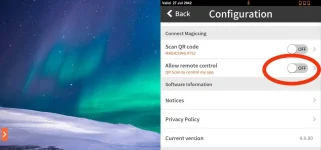
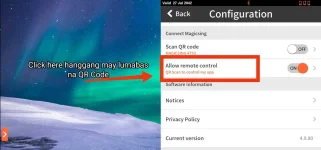
5. On your smartphone naman, launch "Magicsing Karaoke" app, click the QR Code icon on the top-right corner of your screen, at i-scan yung QR code na nakadisplay sa screen ng Android TV or PC nyo.
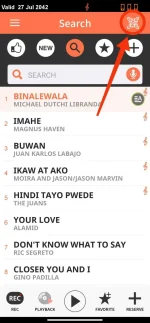
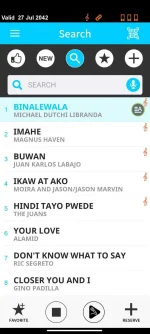
6. Kapag naging blue na ang UI color ng Magicsing Karaoke app, meaning, connected na po ang iyong smartphone sa Android TV or PC nyo. Pwede na kayong magplay and reserve ng kanta sa Magicsing Karaoke app ng Android TV gamit ang smartphone nyo. Mas maganda kung may amplifier kayo para doon i-connect yung audio output ng Android TV/PC at makaconnect din kayo ng microphone.
Sorry if medyo unclear yung instructions ko. Update ko lang yung thread ko if ever may unclear and di maintindihan na instructions. Reply lang po kayo kung may questions kayo

Para sa may gusto ng FREE 20 YEARS MAGIC SING SUBSCRIPTION, pwede po kayo mag-dm sa akin.
Thread Update #1:
User Background
Para makamodify ng user background, go to "Configuration", "Select Background" and select "User Background". Copy lang po kayo ng picture or video files na gusto nyong gawing background sa directory path na ito:
Internal Storage > DCIM > MAGICSING

 ks
ks